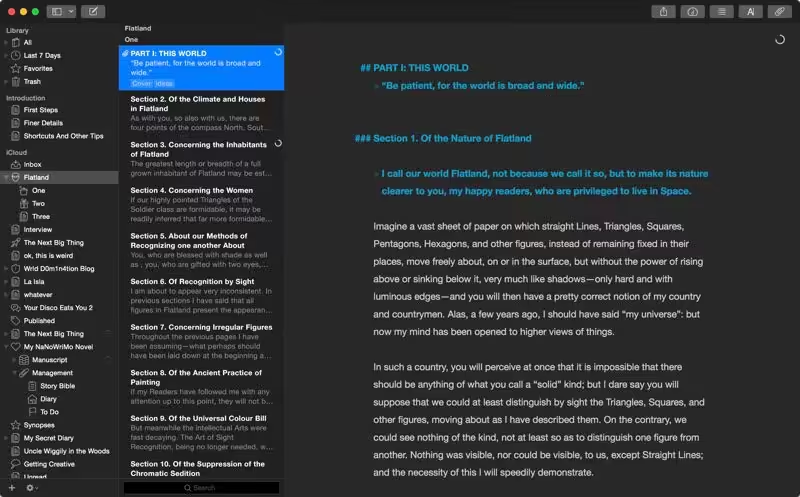
Ulysses lets you focus when you need to concentrate. It keeps all your texts neatly stuffed in its intuitive library. With a few clicks, Ulysses can create beautiful documents from your manuscripts: PDFs, web pages, even iBooks-ready ePubs. With its simple, clutter-free interface, it will turn work hours into a fun time. And mere thoughts into powerful stories. If you love to write and write a lot, Ulysses is made for you.

Download
2 versions
Download Now
41.1 · FREE · Universal
- Size
- 39.9 MB
- Requires
- Universal
- Architecture
- Universal
- Features
- Screenshots 2
- Whats new?
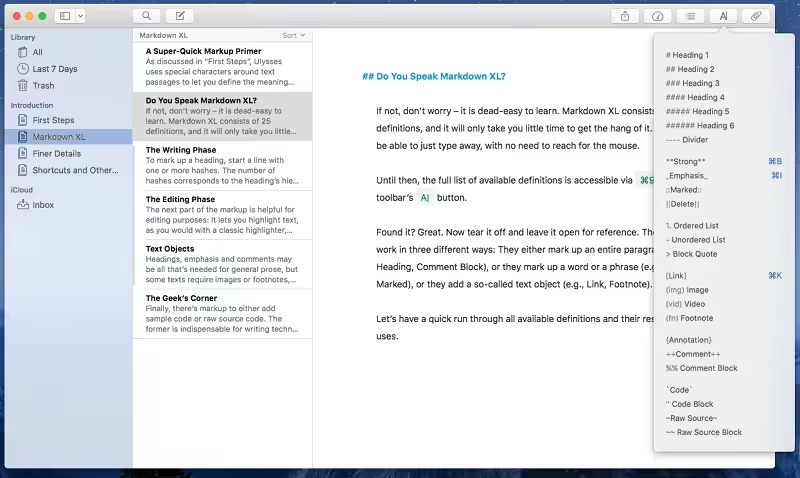
- A Text Production Powerhouse: Ulysses’ markup-based, distraction-free editor lets you focus on your most important task: Write, edit, and write some more. Formatting is kept for later, so you can completely immerse yourself in the text. Ulysses’ uniquely streamlined toolset covers the entire writing process, and its clean and simple interface will boost your productivity. From first to final draft, from the prologue to the closing chapter – Ulysses keeps you in the flow, so you can get stuff done.
- All Your Texts, All the Time: Everything you’ll ever write is stored in Ulysses’ unified library. You can manage projects of all kinds and sizes, be it novels, diaries, or study notes – they are always saved, and automatically in sync. And since Ulysses offers feature parity across macOS and iOS, it doesn’t matter where you are or when inspiration hits: All its tools, and all your texts, are always at your fingertips.
- Create eBooks, DOCX, PDFs, and HTML: Ulysses’ export is flexible enough to cover any writer’s needs: Transform your text into beautiful PDFs, Word documents, or eBooks. Or export HTML code, ready to be used anywhere on the web. You can even choose between a variety of pre-made formatting styles for all kinds of purposes, or create your own and share it with other users.
- Publish to WordPress, Ghost & Medium: Do you blog? Ulysses offers best-in-class publishing to WordPress, Ghost, and Medium. You can post to WordPress and Ghost from right within the app – complete with images, tags, categories, etc. Publishing to Medium works just as easy, and all three offer a built-in preview to proof-read before submission.
- Pricing: Ulysses requires a subscription. We offer monthly and yearly subscription plans. They include a fully functional 14-day trial, so you can test Ulysses (including export and sync). There’s also a special discount for students.
What's New in Version 41.1
- There is a new publishing integration: You can now upload posts to your Micro.blog account from within Ulysses.
- WordPress publishing gained the option to update previously published posts.
- You can now display headings in the editor in a larger size.
- The new default theme D22 demonstrates this new setting and lets you easily distinguish your headings.
- You can now color-customize your group icons.
- We revamped the look & feel of several panels, e.g., you can now type to filter in the markup and the navigation panel.
Older versions & Compatibility
Running macOS Catalina, Big Sur, Monterey, or Ventura? Download tested builds for Intel and Apple Silicon.
-
41.1 LatestOct 15, 2026 · 39.9 MB · Universal
-
40.4 ArchivedOct 15, 2026 · 39.9 MB · Universal
Verified secure servers
Official Website





No comments yet
Share whether this build worked on your Mac, on which macOS version, and your tips.