
Screenshots
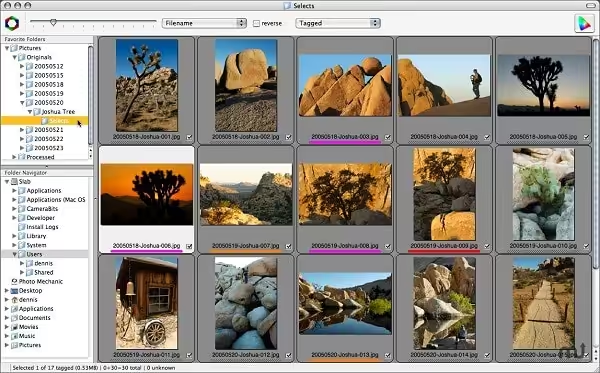
Photo Mechanic is the ultimate image browser for professional digital photographers, delivering unparalleled speed and ease-of-use for managing camera files. Optimized for modern macOS, including Apple Silicon, it excels with innovative batch captioning, renaming, and speedy browsing. It stands out as an essential tool in macOS Media & Design, streamlining workflows with robust Photoshop connectivity.
Features
- Rapid Image Ingestion: Efficiently ingest and preview thousands of digital camera files at unmatched speeds, saving valuable time.
- Advanced Batch Captioning: Streamline your workflow by applying descriptive captions and essential metadata to entire batches of photos instantly.
- Intelligent File Renaming: Effortlessly rename vast collections of photos using powerful, customizable rules and sequential numbering for organization.
- Blazing-Fast Browsing: Experience lightning-fast navigation and previewing of your entire image library, even with large RAW files.
- Seamless Photoshop Integration: Instantly open selected images directly in Adobe Photoshop for advanced editing, enhancing your creative process.
- Efficient Image Culling: Accelerate your selection process by rapidly culling, rating, and tagging images to find your keepers.
- Customizable Workflow Tools: Adapt the powerful interface and tools to perfectly fit your unique photographic workflow and preferences.
What's New
October 19, 2026- (Mac Retina only) Loupe cursor not working with pictures of 2000 by 1333 pixels
- Photo Mechanic not erasing disks when Ingest completes successfully
- On Mojave, thumbnails in Contact Sheet are hidden during certain operations
- Clicking a hover button while moving the mouse changes selection
- The issue with “Adjust Capture Date/Time” giving RAW file more recent time than XMP sidecar
- Unable to drag RAW+JPEG+WAV to a folder in Navigator & Favorites
Recent posts
See all ›
Compress Any Video PRO
v2.1 · Updated Nov 24, 2026

GraphicConverter 11.6.1 (5487)
v11.6.1.5487 · Updated Nov 24, 2026

Adobe Acrobat DC Pro 2022.001.20112
v2022.001.20112 · Updated Nov 24, 2026

Maxon Cinema 4D R26.
v013 · Updated Nov 24, 2026

Luminar Neo 1.0.5 (11374)
v1.0.5.11374 · Updated Nov 24, 2026

Sip 4.0.0
Updated Nov 24, 2026
Version history
Oct 7, 2026 · 59.8 MB
More apps for you
See all Media & Design ›





Ratings & Reviews
(1 rating)Reportar Enlace Caído
Photo Mechanic · v2025.1.8239
¡Reporte Enviado con Éxito!
Hemos notificado al equipo técnico. Revisaremos el enlace y lo actualizaremos a la mayor brevedad.