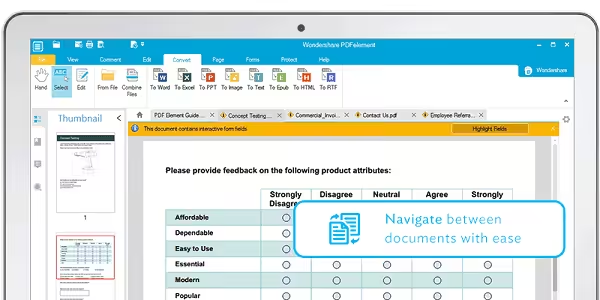
Meet All-New PDFelement 7 Pro – the most Powerful and Simple PDF solution that changes the way you work with your important documents forever. PDFelement delivers a better way to transform your office documents. Enjoy powerful features to edit, convert, annotate, sign, and fill PDFs like never before.

Download
12.1.28 · FREE
Download Now
12.1.28 · FREE · Universal
- Size
- 918.1 MB
- Requires
- Universal
- Architecture
- Universal
- Features
- Screenshots 1
- Whats new?
- Brand New Design: Work better, faster, and easier with a revamped design consistent across Windows and Mac. Form data automation
- Form Data Automation: Empower your business workflow with advanced form automation and data extraction technology. text editing
- Smarter, Faster Text Editing: Get an extremely smooth text editing experience that is like Microsoft Word™.
- The Complete PDF Solution: Get everything you need to create, convert, edit, and sign PDFs. Best of all, it’s affordable.
- Edit PDFs like Word: It’s never been easier to edit any Microsoft™ office files without compromising formatting & style.
- OCR: Use a robust Optical Character Recognition feature to free text from scans and photos and transform it into editable, searchable, and selectable PDFs.
- Text Autofit: Automatically reflow text when altering paragraphs in a single line or paragraph mode.
- Spell Check: Fix typos and other small mistakes highlighted for you with automated spelling error detection.
- Export Form Data into Excel: Use our intelligent form automation technology to extract PDF form data from hundreds of identical forms into a single, accessible Excel sheet within seconds.
- Export Data from Scanned PDFs: Use advanced OCR technology to quickly and accurately convert piles of paper documents into archive- and analysis-friendly Office files.
- Templates: Create your own form template. Or draw from a library of 8000+ forms used commonly across a range of departments and industries.
- Create from Files: Create professional-looking PDFs from all the popular Office file types, plus 300+ other file types, and images, like JPEG, TIFF, and PNG.
- Speedy PDF Creation: Combine hundreds of files in different file types into a single PDF.
- Reorder, Split, Add: Manage drag-and-droppable page thumbnails in an enlarged window to add, split, delete, and reorder pages.
- Bates Numbering: Add customizable Bates Numbering to documents for easy indexing and retrieval.
- Convert: Transform PDFs into various file types, like Microsoft™ Word, Excel, PowerPoint, HTML, JPEG, and more with a simple click.
- Split PDFs: Split large PDFs into multiple smaller ones and save them into multiple file formats.
- Extract Pages: Pick a single page or range of pages from a document and convert them into a separate PDF.
- Batch Convert: Turn multiple PDF files into Microsoft™ Word, Excel, PowerPoint formats, and more all at one time.
- Password Protection: Password protect PDF files with nearly unbreakable 256-bit AES encryption. Customizable controls let you lock specific functions like view, print, edit, fill, and rotate.
- Redaction: Click-and-drag to permanently conceal text and images with user-selected colors. Then add custom overlay text or redaction codes.
- Sign: Create and manage digital signatures to approve and sign documents electronically.
- Share: Share your protected, digitally signed PDFs directly via Dropbox, or click to send them as an email attachment.
- Annotate: Collaborate on PDFs by adding sticky note comments and text boxes anywhere you like.
- Markup: Markup documents for reviewing with highlight, cross-out, underline, and other text tools.
- Shapes: Use custom images and hand drawing tools to create familiar shapes — like lines, rectangles and arrows.
- Stamps: Insert commonly used stamps, like “sign here” flags and “approved”. Or customized your own stamps and save them for later.
What's New in Version 12.1.28
- Support subtract and divide for form calculation.
- Support to print with different units of the page size.
- Change the default open file path and save the file path the same as last time.
- Fixed the crash issue that might happen in a certain situation.
Older versions & Compatibility
Running macOS Catalina, Big Sur, Monterey, or Ventura? Download tested builds for Intel and Apple Silicon.
-
12.1.28 LatestOct 15, 2026 · 918.1 MB · Universal
Verified secure servers
Official Website




No comments yet
Share whether this build worked on your Mac, on which macOS version, and your tips.