Network Radar is a robust network scanning and management tool that is accessible to everyone. Discover which devices are connected to your network, detect potential intruders, troubleshoot network issues, and receive notifications of changes.

Download
2 versions
Download Now
3.2.1 · FREE · Universal
- Size
- 28.7 MB
- Requires
- Universal
- Architecture
- Universal
- Features
- Screenshots 3
- Whats new?
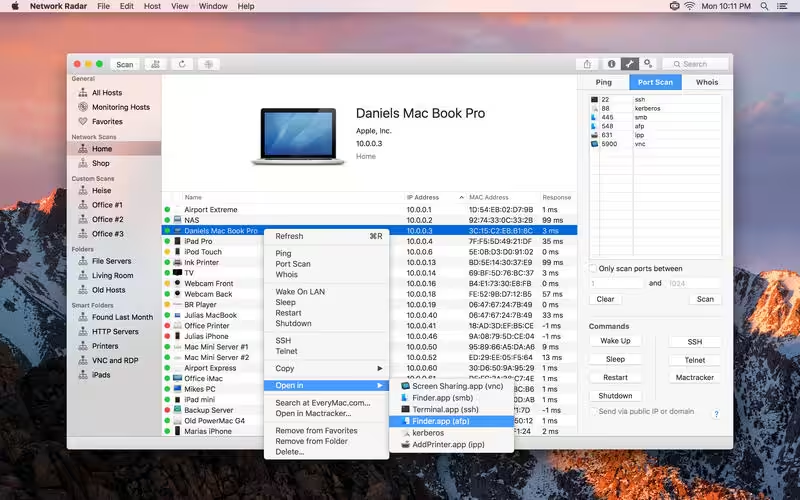
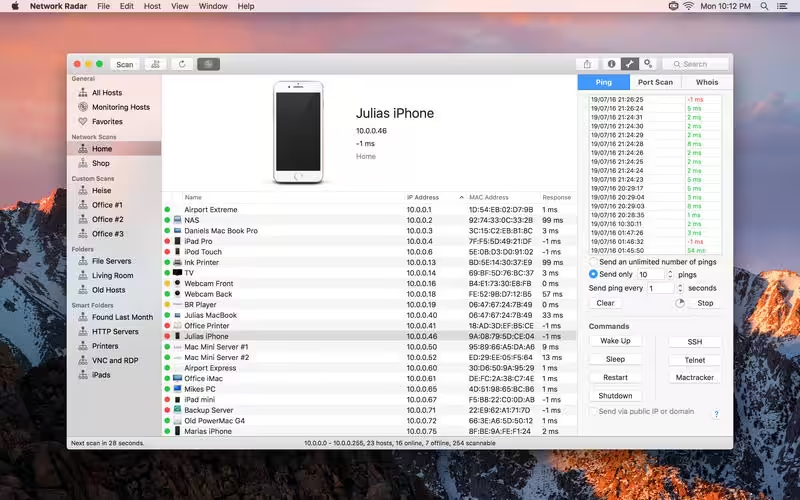
All you have to do to use Network Radar is to click the Scan button. No configuration is required. But Network Radar is more than a simple IP scanner. It comes with useful network tools, such as Ping, Portscan, Traceroute, and Whois. Furthermore you can send commands to your devices with the click of a button. Use Wake On LAN with every Wake On LAN capable device and shut down, restart or send other Macs to sleep, even if they are not within your local network.
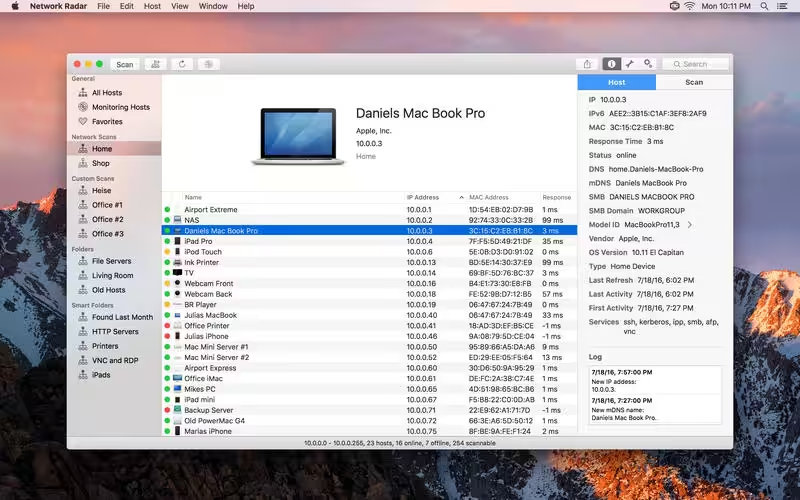
Once Network Radar has scanned your network, it lists all devices – even those that have been online before you started the first scan. Select a device on the list to see more details, such as IP, IPv6, and MAC address, vendor name, DNS names, mDNS name, NetBIOS name, NetBIOS domain, open ports, response time, and more.
Let Network Radar monitor a scan and get live updates on changes in your network. All changes are logged so you always know what happened when. You may also want to receive notifications when a device enters or leaves your network. With the possibility to configure custom rules and actions Network Radar can send yourself a mail as soon as a certain server goes offline or play a sound when a FTP Server appears in your network. The possible configurations are endless.
Organise your hosts in folders. You want all your iPads in one folder? Just create a smart folders and let Network Radar do the work. By binding scans to networks, Network Radar always knows if a devices is reachable or not, making it easy to refresh or monitor a bunch of devices even from different networks.
KEY FEATURES:Network Radar offers many features in a single, elegant interface. Here are just a few of them:
- Scan your network and retrieve detailed information about network devices
- Run useful network tools and commands with the click of a button
- Monitor devices and get notified about changes in your network
- Use the simple rules / actions system for automatic processing of devices
- Establish a connection to a device by simply double-clicking it in the list
- Customise your devices by assigning your own names, icons, type and vendor names
- Organise your hosts in folders and smart folders
- Create scans with custom IP ranges
- Export a scan to XML, CSV, TXT, PDF or NETRADR and import back to Network Radar
Please note that the amount of information Network Radar can find depends on the network it scans.
What's New in Version 3.2.1
- Enhanced some user interface details for a more intuitive experience.
- The services database and MAC database has been updated.
- The minimum supported macOS version is now 12.
Older versions & Compatibility
Running macOS Catalina, Big Sur, Monterey, or Ventura? Download tested builds for Intel and Apple Silicon.
-
3.2.1 LatestOct 13, 2026 · 28.7 MB · Universal
-
3.2.0 ArchivedOct 13, 2026 · 28.7 MB · Universal
Verified secure servers
Official Website






No comments yet
Share whether this build worked on your Mac, on which macOS version, and your tips.