MovieMator Video Editor Pro
3.2.0Screenshots
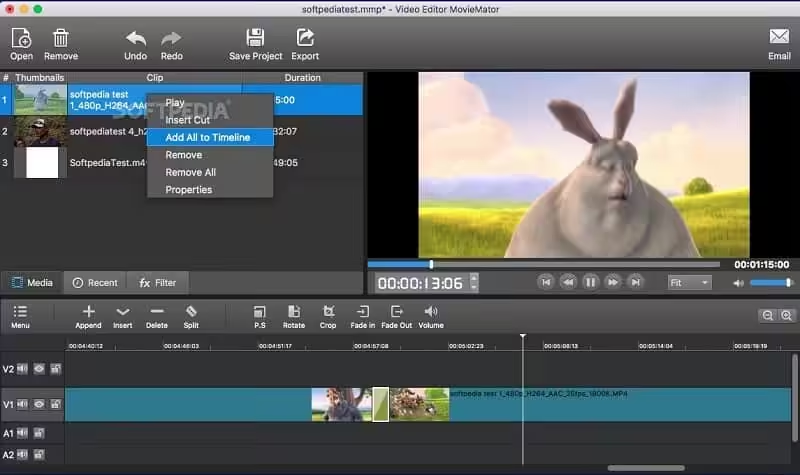
MovieMator Video Editor Pro is a full-featured video editor for creating videos in minutes. It allows users to edit video in many ways, like trimming, cropping, splitting, rotating, and more. With 40+ filter effects supported by keyframes techniques, it is possible to create videos with a variety of eye-catching animation effects. MovieMator Video Editor Mac Pro comes with unlimited video and audio tracks and fully supports all media formats like 4K UltraHD, H.265, MP3, OGG, JPG, SVG, etc.
Features
- Unlimited video tracks and audio tracks help users handle all projects.
- Switch the visibility of the current track to easily preview specific track elements.
- Trim, Merge, Split, Crop, Rotate video clips of any format.
- Transition and various video filters are available.
- Support volume adjustment and various audio filters to create the perfect sound effect.
- Create a Fast/Slow-motion video by adjusting the playing speed as you like.
- Set fade in/out time for videos and audios with freedom.
- Customize the content/color/size/position of the text to create personalized subtitles.
- Mute the original audio with one-click to easily change the background music of videos.
- Precise control over all video, audio, and image frame by frame.
- Import all videos/photos shot by iPhone 6s, GoPro, camcorder, or other devices.
- Support videos/images downloaded from Facebook, Instagram, Flickr, and more sites.
- Support videos with voiceover that recorded by any screen recording software.
- All popular video/audio/image formats: MP4, AVI, MPEG, WMV, MKV, MPG, RMVB, M4V, 3GP, FLV, TS, M4V, VOB, F4V, MP3, WAV, MKA, OGG, FLAC, AAC, JPG, PNG, TIF, BMP, SVG…
- Work natively with a broad range of formats including ProRes, RED, XAVC, AVCHD, H.264 from DSLR, and more.
- The interface of MovieMator is intuitive and all features are clear at a glance.
- Easy-to-use cut, copy, and paste operations.
- Hide, mute, and lock video track and audio track with one-click.
- Arrange and Trim all elements (videos/audios/images) on the timeline by dragging and dropping.
- A real-time preview feature ensures what you see is what you get.
- Incredibly fast export of HD videos in 200+ media formats for playback on all devices.
- Customize output parameters like resolution, frame rate, aspect ratio, encoding and etc.
- Save the file as a project for direct editing next time.
- Autosaves the project when the window is closed unexpectedly.
Note: MovieMator Video Editor Pro is designed to create short videos quickly. Users can export videos for 5 minutes. One default transition and several filters (fade-in, fade out, Text, Resize, Rotate, Volume, Crop. ) are available in MovieMator Video Editor Pro. If you want to export videos of any length with numerous transition and filter effects, please upgrade to MovieMator Video Editor Pro.
Key Features of MovieMator Video Editor Pro:- 40+ built-in filter effects supported by KeyFrame animation technique: Text, Blur, Old Film, Sharpen, Stabilize, Vignette, White Balance…
- 20+ stunning transitions: Dissolve, Iris Circle, Clock Top, Cut, Bar Vertical…
- Export videos of any length.
What's New
October 25, 2026- Fix a crash bug when launching app.
- Fully compatible with macOS Big Sur.
Recent posts
See all ›
Aberrant DSP Digitalis v
v1.0 · Updated Nov 24, 2026
motionVFX – mPrism for Final Cut Pro
v2 · Updated Nov 24, 2026

Ammonite
v1.23.1 · Updated Nov 24, 2026

PopDo 2021.2.8
v2021.2.8 · Updated Nov 24, 2026

SQLPro for SQLite 2022.28
v2022.28 · Updated Nov 24, 2026

Noir – Dark Mode for Safari 2026.2.4
v2026.2.4 · Updated Nov 24, 2026
Version history
Oct 25, 2026 · 102.9 MB
More apps for you
See all Media & Design ›





Ratings & Reviews
(1 rating)Reportar Enlace Caído
MovieMator Video Editor Pro · v3.2.0
¡Reporte Enviado con Éxito!
Hemos notificado al equipo técnico. Revisaremos el enlace y lo actualizaremos a la mayor brevedad.