Screenshots
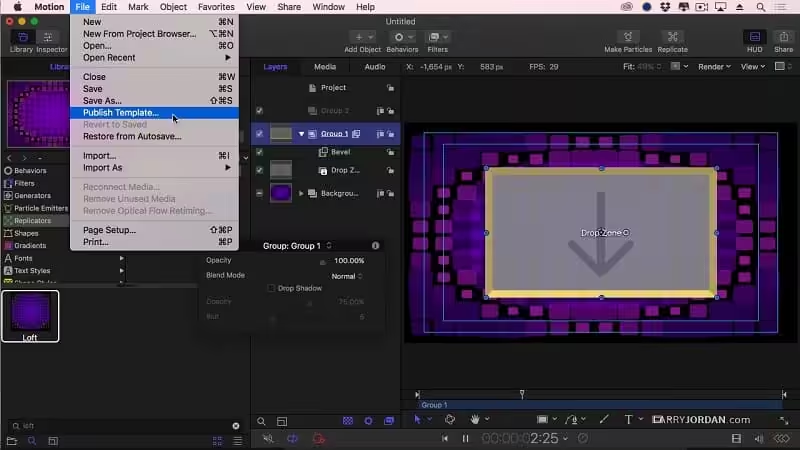
Apple Motion is a powerful motion graphics tool that makes it easy to create cinematic 2D, 3D, and 360° titles, fluid transitions, and realistic effects in real time. And with its all-new Metal engine, Motion lets you build and play back effects at incredible speeds. Designed with editors in mind, Motion features a streamlined interface that lets you easily create titles, transitions, and effects for Final Cut Pro.
Features
- Import 360° media and design 360° titles, generators, and effects
- Build 3D titles from scratch, design them with easy-to-use templates, or instantly convert any existing 2D title to 3D
- Easily create beautiful titles that you can animate using more than 100 drag-and-drop behaviors and intuitive text animation tools
- Customize 3D titles to create endless looks with over 90 Apple-designed 3D materials including various metal, wood, and stone surfaces
- Vector-based characters scale, skew, and rotate with pristine sharpness, while the modern engine in Motion lets you design in real-time
- Save any title, effect, transition, or generator, and access it directly in Final Cut Pro
- Customize Final Cut Pro titles, effects, and transitions by opening them in Motion
- Create Smart Motion Templates with any combination of single parameters and rigs, which let you control a group of parameters with a simple slider, pop-up menu, or checkbox in Final Cut Pro
- Save any 360° motion graphic and access it immediately from the effects browser in Final Cut Pro
- Choose from more than 230 behaviors for natural-looking motion without keyframes
- Use advanced color grading filters like the color wheels, color curves, and hue/saturation curves
- Track a moving object in a video clip with the point tracking and match move feature
- Create an accurate chroma key in a single step with the Keying filter
- Use SmoothCam to eliminate camera jitters and image stabilization to smooth bumpy shots
- Create your own paintbrushes and 3D strokes or use one of 140 brush presets
- Design your own particle emitters or choose from 200 presets for real-world effects such as smoke and sparkles
- Choose a circle or rectangle mask or use the bezier and freehand mask tools to quickly draw and adjust control points for rotoscoping
- Use the intuitive keyframe tools in Apple Motion for precise control of the timing and position in your animation
- Apply 360° effects including blurs, glows, and more
- Add the Tiny Planet filter when adding 360º video to a non-360° project to create interesting spherical looks
- Harness a thriving ecosystem of third-party FxPlug plug-ins with custom interfaces for tasks like advanced tracking, advanced motion graphics, and more
- The transition from 2D to 3D space by adding cameras
- Create 3D scenes within a 360° project for ultra-realistic 360° environments
- Set up realistic shadows that animate dynamically with the movement of cameras and lights
- Track objects or groups of objects with drag-and-drop ease by applying the Camera Framing behavior
- Selectively define focus as an object moves in 3D space
- Turn any shape, video plane, or paint stroke into a reflective surface in 3D space
- Import wide color HDR images, view them on supported Mac computers, and export in standard Rec. 709 or wide Rec. 2020 color space
- Export standard or 360° projects to Apple devices and publish directly to YouTube and Vimeo
- Send to Compressor to access advanced options for custom encoding like HEVC
Some features require Internet access; fees may apply. Video output to VR headset requires a Mac computer with discrete graphics running macOS Mojave. 27-inch iMac with Radeon Pro 580 graphics or better recommended.
What's New
November 1, 2026- Includes stability and performance improvements
Recent posts
See all ›
Nevercenter CameraBag Pro
v2022 · Updated Nov 24, 2026

GraphicConverter 11.6.1 (5483)
v11.6.1.5483 · Updated Nov 24, 2026

GraphicConverter 11.6.1 (5482)
v11.6.1.5482 · Updated Nov 24, 2026

GraphicConverter 11.6.1 (5481)
v11.6.1.5481 · Updated Nov 24, 2026

Adobe After Effects 2022 v22.1.1
v2022.22.1.1 · Updated Nov 24, 2026

Noir – Dark Mode for Safari 2026.2.4
v2026.2.4 · Updated Nov 24, 2026
Version history
Oct 16, 2026 · 2.6 GB
More apps for you
See all Media & Design ›





Ratings & Reviews
(1 rating)Reportar Enlace Caído
Apple Motion · v6.3
¡Reporte Enviado con Éxito!
Hemos notificado al equipo técnico. Revisaremos el enlace y lo actualizaremos a la mayor brevedad.