Mac FoneLab for iOS is an iPhone data recovery tool. It helps you recover lost or deleted data due to jailbreaks, iOS upgrades, etc. from iTunes and iOS devices directly. Mac FoneLab registration code: A straightforward recovery application that makes it easy for you to browse the content of your iOS device and backup files in order to restore lost data.

Download
10.2.68 · FREE
Download Now
10.2.68 · FREE · Universal
- Size
- 60.6 MB
- Requires
- Universal
- Architecture
- Universal
- Features
- Screenshots 2
- Whats new?
Recover Lost/Deleted Data from iOS Devices on Mac
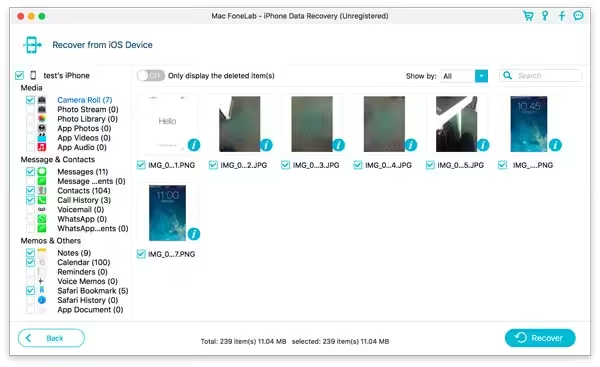
Mac iOS Data Recovery retrieves data from all iOS devices. The recovery software helps you get back lost Contacts, Messages, Call History, Calendar, Notes, Reminders, Safari Bookmarks, and WhatsApp data from iPhone XS/XS Max/XR/X/8/8 Plus/7/7 Plus/SE/6s/6/5s/5c/5/4S. And if you are using iPhone 4/3GS, iPad 1, or iPod touch 4, you can retrieve your lost/deleted data, including Camera Roll, Photo Library, App Video, and Audio, etc.
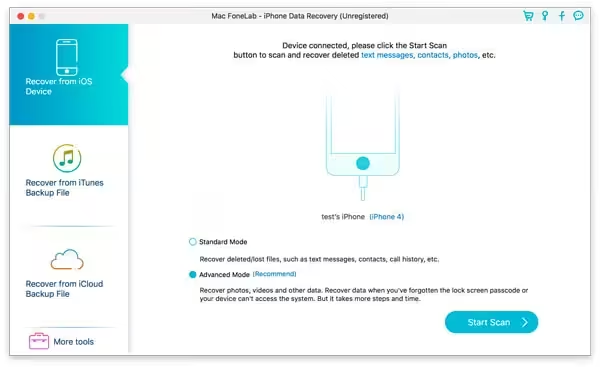
19 kinds of files. Moreover, you can even get access to the deleted, lost, and existing data from your locked/smashed/broken devices entirely, as long as you have ever successfully connected your device with Mac or backed up your device on iTunes/iCloud.
Retrieve Data from iTunes Backup FilesThis iPhone data recovering software helps you to easily recover data from iTunes backup.
It assists you to retrieve 8 types of deleted backup files, including Contacts, Messages, Call History, Calendar, Notes, Reminders, Safari Bookmarks, and WhatsApp data.
In addition, you can extract your Camera Roll, Photo Library, Photo Stream, Message Attachments, and Voice Memos from your iTunes backup files.
Download and Extract Lost Files from iCloudHow to restore iPhone data from iCloud? You can try this Data Recovery for the Mac version. If you can’t recover deleted data from iPhone/iPad/iPod directly, or can’t recover from iTunes backup files, you can try this recovery method – recovering from iCloud backup files.
You can sign in to your iCloud account from the data retrieving app interface and restore the deleted files from the iCloud backup files, including contacts, Text Messages/iMessages, Call history, Calendar, Notes, Reminder, Safari bookmark, Safari history, WhatsApp messages, or attachments.
And this data recovering software for Mac can allow you to view lost data as you need.
Preview File before Recovering and Saving TimeApart from its three recovery modes, the iPhone data restoring program also enables you to preview the lost data info before recovery, which is especially useful when you need to recover specific files.
You’ll find all scanned files displayed in the preview window in the category; both lost and existent files are visible. Just click the file type to see the detailed information. And you can choose to recover which one or several lost/deleted files as you like. This will make your work much more efficient and save you a lot of time!
What's New in Version 10.2.68
- Fixed some minor bugs
Older versions & Compatibility
Running macOS Catalina, Big Sur, Monterey, or Ventura? Download tested builds for Intel and Apple Silicon.
-
10.2.68 LatestOct 15, 2026 · 60.6 MB · Universal
Verified secure servers
Official Website




No comments yet
Share whether this build worked on your Mac, on which macOS version, and your tips.