
Screenshots
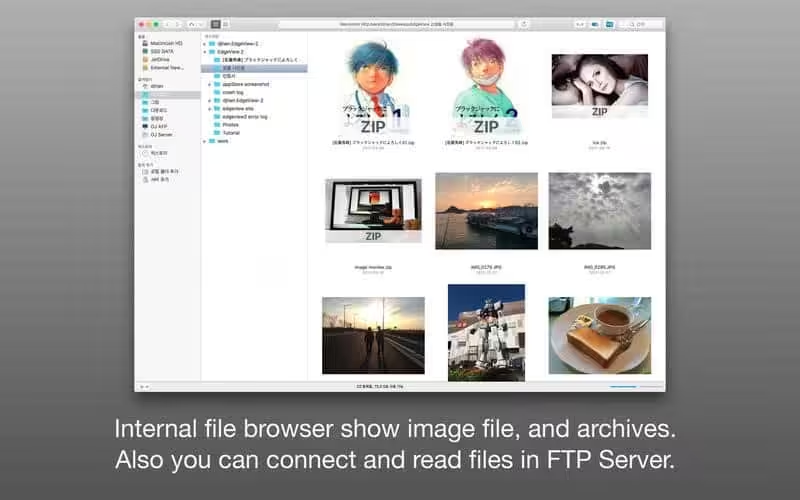
EdgeView is a fast image viewer that has an elegant user interface. EdgeView 3 is developed and designed for modern macOS. It can open various image files such as JPEG, PNG, TIFF, BMP, and RAW files of DSLR, EPS, PDF, and AI(Adobe Illustrator). Can open image files in the archive directly without extraction.
Features
- Rewrote the full code in Swift for improved performance.
- Support the M1 CPU Mac.
- Has an easy UI and can control the main function in the Sidebar.
- Support English/Korean/Japanese/Chinese(Simplified).
- Supporting image files such as JPG, GIF, BMP, PSD, TIFF, RAW(DNG/ARW/CR2), WEBP, PDF, EPS, AI(Adobe Illustrator), and OpenEXR.
- Supporting major archive formats such as ZIP, RAR, CBZ, CBR, 7-zip, ALZ, etc.
- Can extract the encrypted archive file
- Can read archive file in archive file in archive… as they are
- Advanced pre-read cache for fast loading
- Brilliant prerender option. It displays a low-quality preview image until the image loading is completed
- High-quality image rendering
- Provide a suitable function for comic reading
- Two-page spread, reading from right to left, etc.
- Powerful navigation function
- Move previous/next, skip, move only one page(shift previous/next), etc.
- You can move while EdgeView checking thumbnails with a progress bar and thumbnail bar
- Support for trackpad gestures
- Moving pages with swipe gesture, scaling with pinch gesture
- Built-in loupe function to make it easier to see small character
- Can zoom in/out image freely
- Various special effects can be applied in real-time
- Insert shadow in spread pages, auto level correction, blur, sharpen, unsharpen mask, grayscale, colorize, etc.
- The detailed setting is possible from the effects of HUD
- Can rotate, flip the horizontal, flip the vertical image
- Support for Animated GIFs, and Animated PNG
- Pause/play, move to previous/next frame, and can change frame rates from animated HUD
- Support for Slideshow
- You can adjust transparency for each window
- Can share the image via SNS?
- Can remote control in comicShare app on an iOS device
- Built-in file browser display files as lists or icon
- Can copy and move, delete files.
- Easily add and modify additional information such as rates, writer, category
- Provide search functions such as spotlight search, file name search
- Can connect to FTP server in a file browser
- FTP file search is also supported
- Image files, and archive files in FTP can also be opened directly * 1
- Save opened folders, archive files, and PDF files as history
- The last opened page, file position, special effects, and display settings are saved and restored as it is at the last state when reopening in EdgeView 2.
- Automatically create thumbnails of archive files containing images with the built-in QuickLook plug-in
- Archive files without images display the included file list on the QuickLook panel
- Comics on Screenshot
[Give My Regards to Black Jack], by SHUHO SATO. Distributed in Manga on Web (http://mangaonweb.com/satoshuho/download.html)
* 1) The archive file will be downloaded and opened in a temporary folder. The files in the temporary folder are deleted automatically afterward
What's New
November 18, 2026Release notes were verified and optimized for macOS Sequoia and Apple Silicon.
Recent posts
See all ›
Compress Any Video PRO
v2.1 · Updated Nov 24, 2026

GraphicConverter 11.6.1 (5487)
v11.6.1.5487 · Updated Nov 24, 2026

Adobe Acrobat DC Pro 2022.001.20112
v2022.001.20112 · Updated Nov 24, 2026

Maxon Cinema 4D R26.
v013 · Updated Nov 24, 2026

Luminar Neo 1.0.5 (11374)
v1.0.5.11374 · Updated Nov 24, 2026

Sip 4.0.0
Updated Nov 24, 2026
More apps for you
See all Media & Design ›





Ratings & Reviews
(32 ratings)Reportar Enlace Caído
EdgeView 5.9.8 · v
¡Reporte Enviado con Éxito!
Hemos notificado al equipo técnico. Revisaremos el enlace y lo actualizaremos a la mayor brevedad.