
Screenshots
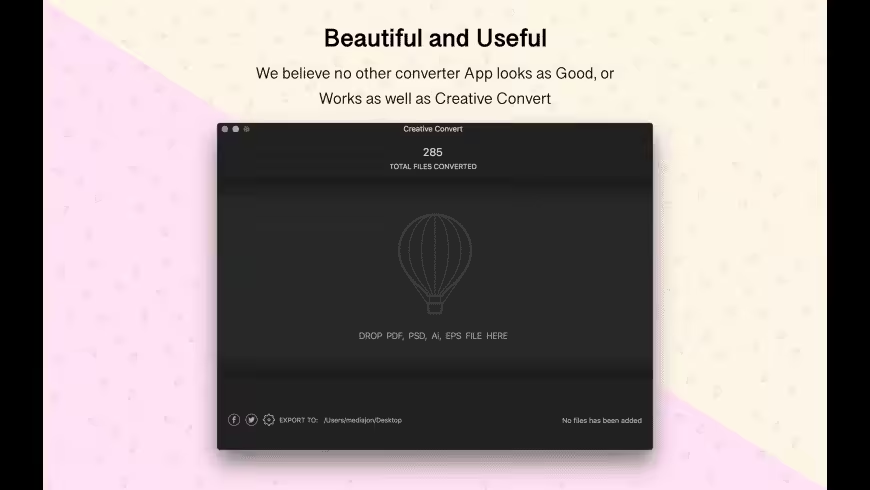
Creative Convert is a simple, beautiful app for converting JPG, JPEG, BMP, TIFF, PNG, PDF, Ai, PSD, and/or EPS files into separate Graphic file formats. Simple and useful productive tool for everyone. If you have any ideas or feature requests, feel free to drop a message regarding your opinions by using our contact us page.
Features
- Create PDF file from graphic files
- Create icons for multiple platforms
- Convert PDF, Adobe Illustrator, Adobe Photoshop and/or EPS documents into BMP, TIFF, JPG, PNG, BMP, TIFF, JPEG, and PSD images;
- Doesn’t need of PDF Reader or Image Editor, Creative Convert creates high-quality Graphic files from your creative files;
- Saves Each page as Separate Graphic image;
- Convert Single or Multiple files at once;
- Drag and Drop Convert;
- Convert documents with hundreds of pages like PDF or Adobe Illustrator file with one click;
- Choose one of 5 different resize options.
What's New
October 26, 2026- Support for the latest system – Creative Convert is now compatible with the latest OS versions
- Improved translations
- Fixed bug where not counting total file
Recent posts
See all ›
Aberrant DSP Digitalis v
v1.0 · Updated Nov 24, 2026

motionVFX – mPrism for Final Cut Pro
v2 · Updated Nov 24, 2026

Ammonite
v1.23.1 · Updated Nov 24, 2026

PopDo 2021.2.8
v2021.2.8 · Updated Nov 24, 2026

SQLPro for SQLite 2022.28
v2022.28 · Updated Nov 24, 2026

Noir – Dark Mode for Safari 2026.2.4
v2026.2.4 · Updated Nov 24, 2026
Version history
Oct 26, 2026 · 9.5 MB
More apps for you
See all Media & Design ›





Ratings & Reviews
(1 rating)Reportar Enlace Caído
Creative Convert · v1.4.3
¡Reporte Enviado con Éxito!
Hemos notificado al equipo técnico. Revisaremos el enlace y lo actualizaremos a la mayor brevedad.