Cinemagraph Pro is the definitive professional tool for crafting stunning "living photos" on macOS. Leveraging unique live-masking technology, it allows artists to preview and create mesmerizing cinemagraphs in real-time. Outputting HD and UHD quality, this Apple Design Award winner, optimized for Apple Silicon, stands out as an essential app in macOS Media & Design for visual storytellers.
Download
2 versions
Download Now
2026.39 · FREE · Universal
All older versions
- Size
- 71.5 MB
- Requires
- Universal
- Architecture
- Universal
- Features
- Screenshots 1
- Whats new?
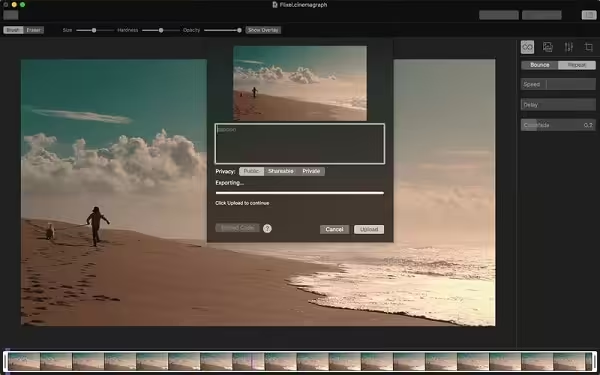
- Professional Cinemagraph Creation: Craft stunning "living photos" with precision using the industry's leading dedicated software for macOS artists.
- Real-time Live Masking: Experience instant feedback and precise control over your living images with innovative, real-time masking capabilities.
- Instant Visual Feedback: See your cinemagraphs come to life instantly as you edit, ensuring a seamless and intuitive creative workflow.
- High-Resolution Export: Deliver breathtaking cinemagraphs in pristine HD (1080p) or stunning UHD (4K) quality for professional use.
- Seamless Loop Control: Master the flow of your living photos with advanced loop options, ensuring smooth, captivating, and endless playback.
- Intuitive Editing Tools: Refine your cinemagraphs with essential editing tools, including color correction, cropping, and playback speed adjustments.
- Integrated Stabilization: Ensure your source video is steady and professional with built-in stabilization features for flawless cinemagraph creation.
What's New in Version 2026.39
- Monthly plans now available
- Improved crop tool
- Support for macOS Sierra
- Fixed GIFs exported with a pause between loops
Older versions & Compatibility
Running macOS Catalina, Big Sur, Monterey, or Ventura? Download tested builds for Intel and Apple Silicon.
-
2026.39 LatestOct 06, 2026 · 71.5 MB · Universal
-
2026.13 ArchivedOct 06, 2026 · 71.5 MB · Universal
Verified secure servers
Official Website


No comments yet
Share whether this build worked on your Mac, on which macOS version, and your tips.