
Wondershare Photo Cutter
1.0.7Screenshots
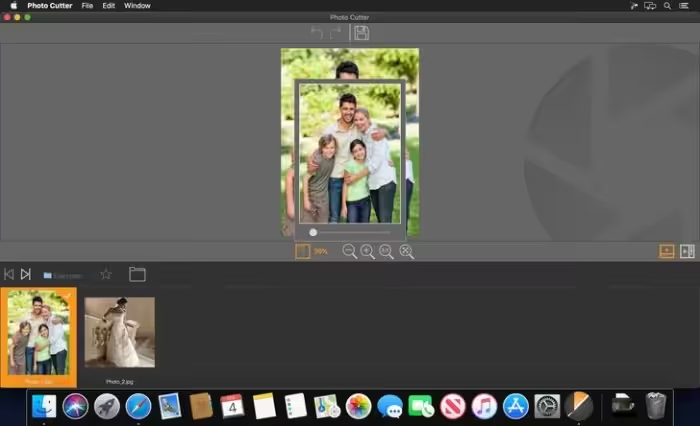
Professionally remove background without being a pro. Need a transparent background for product pictures or profile images, or a replacement of background for a person or an object? This smart, efficient, and cost-effective tool will bring you precision results from your imprecise marks.
Features
- Customized Brush Sizes: Make your brush as small as 1px or as large as 250px
- Background Templates: Choose from 20 preset backgrounds in a variety of styles
- Drag & Drop Interface: An intuitive design that is easy to learn, regardless of your skill level
- Straighten Line: Draw a line and your photo will be automatically straightened
- Edge Blur: Smoothly overlay cutout objects over whatever backgrounds you choose
- Built-In Tutorial: Learn how to use this simple program with this interactive step-by-step guide
- Cut & Crop: Resize your photo or change its aspect ratio easily
- Wide Format Support: Support Jpeg, TIFF (8-bit or 16-bit), PNG, BMP, GIF, Jxr or Jiff
What's New
October 25, 2026- Release notes were unavailable when this listing was updated.
Recent posts
See all ›
Aberrant DSP Digitalis v
v1.0 · Updated Nov 24, 2026

motionVFX – mPrism for Final Cut Pro
v2 · Updated Nov 24, 2026

Ammonite
v1.23.1 · Updated Nov 24, 2026

PopDo 2021.2.8
v2021.2.8 · Updated Nov 24, 2026

SQLPro for SQLite 2022.28
v2022.28 · Updated Nov 24, 2026

Noir – Dark Mode for Safari 2026.2.4
v2026.2.4 · Updated Nov 24, 2026
Version history
Oct 25, 2026 · 33.6 MB
More apps for you
See all Media & Design ›





Ratings & Reviews
(1 rating)Reportar Enlace Caído
Wondershare Photo Cutter · v1.0.7
¡Reporte Enviado con Éxito!
Hemos notificado al equipo técnico. Revisaremos el enlace y lo actualizaremos a la mayor brevedad.