
Screenshots
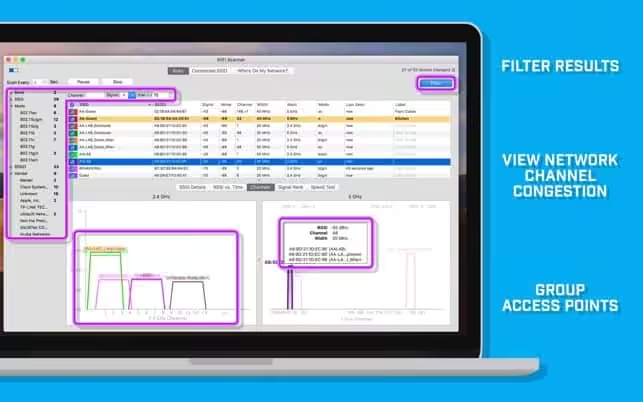
WiFi Scanner is an 802.11 wireless scanner and connection manager. This will detect access points and clients in ad-hoc mode if the SSID is being broadcast. It can be used for wireless site surveys, wireless discovery, and connecting to Wi-Fi networks. The tool reports signal strength in dBm and shows access point BSSID/MAC addresses.
Features
Using WiFi Scanner you’ll see nearby wireless access points and their details, including channels, signal levels (RSSI), noise, channel width, and MAC address, signal quality, maximum data rate, encryption, and much more.
It also includes upload and download speed testing to quickly measure and analyze WiFi Internet performance problems.
“…your wireless router is fighting for spectrum with its neighbors, potentially slowing you down and making your Internet experience less pleasurable. …WiFi Scanner helps you solve this problem by showing you all the access point(s) nearby, and suggesting the best configuration settings to get the most out of your router.” — MacWorld
Simple, fast wireless network discovery of 802.11 a/b/g/n/ac access points. WiFi Scanner is great for determining the best position for an access point at home or in the office.
After selecting the best position, the optimal channel to use can be determined by selecting the least used channel resulting in improved WiFi speeds.
Key Features- Simple, fast wireless network discovery of 802.11 a/b/g/n/ac access points.
- Connect to detected networks using the join button
- Full support for both 2.4 and 5 GHz networks
- Support for all channel bandwidths (20, 40, 80, and 160 MHz)
- Display detailed wireless network parameters: network name (SSID), signal level (RSSI), MAC address (BSSID), signal quality, channel, maximum data rate, encryption, etc.
- Display changes in signal level over time in graphical form.
- Filter list of detected wireless networks by specified parameters (SSID/network name, channel, channel band, signal strength)
- Display wireless connection statistics in the form of graphs and tables.
- Give each access point a custom label
- Export results to comma-separated value (CSV) files
- Generate summary reports in HTML format
- Upload and download WiFi speed testing
- Use speed testing feature to troubleshoot WiFi networks
- Autorun speed test when the client roams to the different access point
- Auto-repeat speed test with wait time between tests
- Fast IP scanner that detects unknown devices connected to your WiFi network.
- Detects hostnames, determines the MAC address, and in some cases can auto-detect device type (phone, laptop, router, etc).
- Configured icon for discovered devices is saved for future scans.
- Scanning results can be saved to CSV files via the menu export option.
- Great for finding WiFi “Piggybackers”.
- Display access point name if configured by the network administrator
- Display number of devices connected to each access point
- Display channel utilization
- Display if 802.11r is enabled and type
- Display if WiFi protection mechanisms are enabled
For questions, feature requests, or support please email [email protected] or contact us via Twitter @accessagility.
What's New
November 14, 2026- bug fixes and improved performance
Recent posts
See all ›
Aberrant DSP Digitalis v
v1.0 · Updated Nov 24, 2026

motionVFX – mPrism for Final Cut Pro
v2 · Updated Nov 24, 2026

Ammonite
v1.23.1 · Updated Nov 24, 2026
PopDo 2021.2.8
v2021.2.8 · Updated Nov 24, 2026

SQLPro for SQLite 2022.28
v2022.28 · Updated Nov 24, 2026

Noir – Dark Mode for Safari 2026.2.4
v2026.2.4 · Updated Nov 24, 2026
Version history
Oct 18, 2026 · 16.0 MB
More apps for you
See all System Utilities ›





Ratings & Reviews
(1 rating)Reportar Enlace Caído
WiFi Scanner · v3.4.0
¡Reporte Enviado con Éxito!
Hemos notificado al equipo técnico. Revisaremos el enlace y lo actualizaremos a la mayor brevedad.