Transmit is a powerful and elegant FTP, SFTP, S3, and WebDAV client, designed for seamless file transfers on macOS. It offers unparalleled speed and a highly intuitive, Mac-native interface, making complex file management remarkably simple. As a vital tool among macOS System Utilities, it ensures efficient and secure data handling for all users, fully optimized for Apple Silicon.

Download
2 versions
Download Now
5.11.7 · FREE · Universal
All older versions
- Size
- 32.0 MB
- Requires
- Universal
- Architecture
- Universal
- Features
- Screenshots 1
- Whats new?
- Robust Multi-Protocol Support: Seamlessly connect to FTP, SFTP, Amazon S3, and WebDAV servers for comprehensive file access.
- Native macOS Interface: Experience a highly intuitive and familiar Mac-like design, simplifying complex file transfers with ease.
- Blazing Fast Transfers: Leverage optimized engines for rapid uploads and downloads, ensuring efficient data movement every time.
- Advanced File Management: Effortlessly upload, download, delete, and organize files across various remote servers directly from your Mac.
- Secure Connections: Benefit from secure SFTP and S3 protocols, protecting your valuable data during every transfer operation.
- Drive-Like Mounting: Mount your favorite FTP, SFTP, or S3 servers directly in Finder for unparalleled convenience and access.
- Refined Core Performance: Enjoy a significantly improved and stable application core, delivering enhanced reliability and responsiveness.
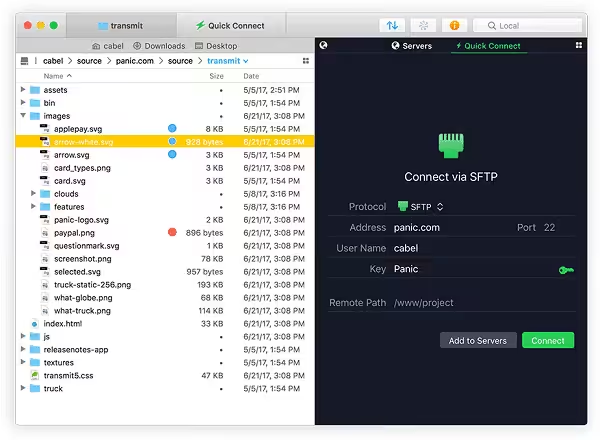
What's New in Version 5.11.7
- OneDrive: Added support for browsing shared folders
- Added the option to open a new Transmit window from the contextual menu
- File Browser: Improved sorting of items without “Date” or “Size” attributes
- Fixed a crash when using KeyCue and other apps that utilize macOS accessibility technologies
- Resolved a potential crash when quickly closing a new window
- Improved the ability to maintain file selection during local move operations
- Choosing “Always Open With” from the file contextual menu now works as expected
- Addressed a potential issue uploading large folders that contain resource forks
- Unmounting and re-mounting a DMG no longer causes related places bar bookmarks to stop functioning
- Column View: Fixed a case where newly created child folders could still be shown in the file browser after being deleted
- Info Pane: The S3 ‘Bucket Logging’ toggle now works as expected
- Microsoft Azure: Improved handling of errors when usernames contain invalid characters
- Various cosmetic improvements
Older versions & Compatibility
Running macOS Catalina, Big Sur, Monterey, or Ventura? Download tested builds for Intel and Apple Silicon.
-
5.11.7 LatestOct 06, 2026 · 32.0 MB · Universal
-
5.11.6 ArchivedOct 06, 2026 · 32.0 MB · Universal
Verified secure servers
Official Website





No comments yet
Share whether this build worked on your Mac, on which macOS version, and your tips.