
Screenshots
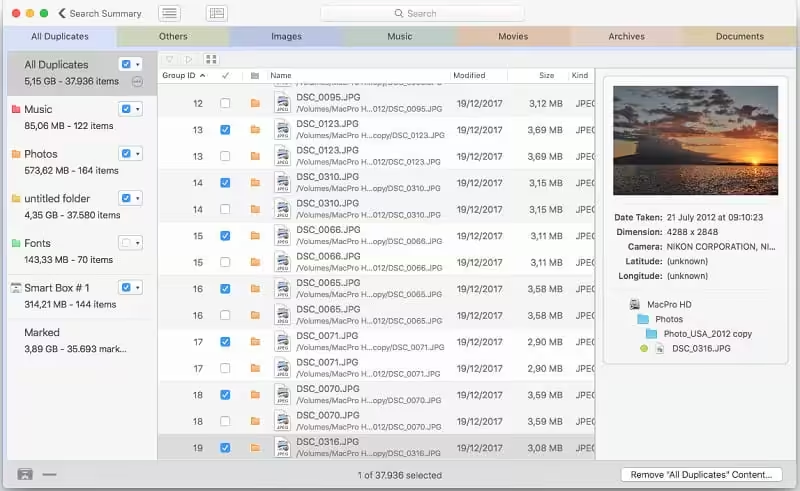
Tidy Up is a robust duplicate file finder and disk tidiness utility for macOS. It meticulously scans your system to identify and eliminate redundant files, reclaiming valuable storage space and enhancing organization. Optimized for Apple Silicon, it stands out as an essential tool in macOS System Utilities, ensuring your Mac runs efficiently and clutter-free.
Features
- Advanced Duplicate Search Filters: Pinpoint duplicates using extensive criteria like content, type, date, name, and application owner for precise results.
- Media Metadata Scanning: Detect duplicate MP3/AAC files by tags, duration, and bit rate, plus EXIF metadata in photos.
- Database Content Analysis: Scan and identify duplicates within Photos, iPhoto, Aperture, iTunes, iPod, and Mail databases for thorough cleanup.
- Smart Deletion Sync: Seamlessly synchronize duplicate deletions across iPhoto, Mail, and iTunes libraries, maintaining data integrity.
- Comprehensive Disk Cleanup: Reclaim significant disk space by eliminating redundant files and packages across your entire macOS system.
- Granular Search Customization: Tailor search parameters with fine-grained control over file attributes, ensuring precise and targeted duplicate detection.
- High-Performance Scanning: Experience fast and efficient scanning, leveraging modern macOS technologies for quick duplicate identification.
What's New
October 27, 2026- Bug fixes.
Recent posts
See all ›
Aberrant DSP Digitalis v
v1.0 · Updated Nov 24, 2026

motionVFX – mPrism for Final Cut Pro
v2 · Updated Nov 24, 2026

Ammonite
v1.23.1 · Updated Nov 24, 2026

PopDo 2021.2.8
v2021.2.8 · Updated Nov 24, 2026

SQLPro for SQLite 2022.28
v2022.28 · Updated Nov 24, 2026

Noir – Dark Mode for Safari 2026.2.4
v2026.2.4 · Updated Nov 24, 2026
Version history
Oct 27, 2026 · 12.6 MB
More apps for you
See all System Utilities ›





Ratings & Reviews
(1 rating)Reportar Enlace Caído
Tidy Up · v6.0.10
¡Reporte Enviado con Éxito!
Hemos notificado al equipo técnico. Revisaremos el enlace y lo actualizaremos a la mayor brevedad.