Screenshots
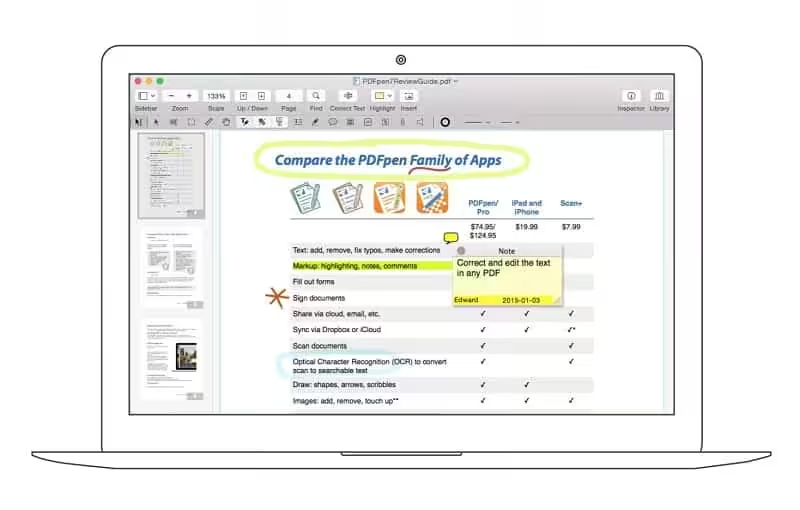
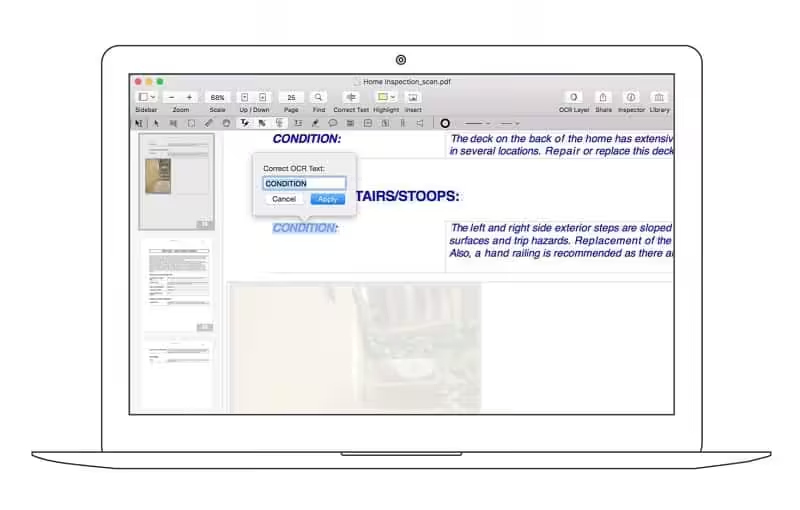
PDFpenPro enables PDF power users to create interactive forms, including click-to-sign signature fields; edit OCR text; add and edit tables of contents; convert websites into PDFs; set document permissions. Edit PDFs easily Add text, images, signatures, highlights, and comments. Make changes, fix typos, fill out forms, and redact sensitive information. Use OCR (Optical Character Recognition) to turn a scan into an editable text.
Features
- Mark up documents with highlighting, underscoring, and strikethrough
- Add text, images, and signatures to PDF
- Correct text in original PDF with editable text blocks
- Move, resize, copy, and delete images in the original PDF
- Copy and paste rich text; retain fonts and formatting when copying from PDFs, including columns
- Add, edit, preview, and extract file attachments and annotations
- Record and playback audio annotations
- Add notes, comments, and cloud annotations
- Snap objects in place with guides
- Add page numbers, bookmarks, headers, footers, line numbers, and watermarks
- Perform OCR (Optical Character Recognition) on scanned documents singly or in batch OCR
- Edit OCR text from your scanned pages
- Scan directly from Image Capture or TWAIN scanners
- Adjust resolution, color depth and contrast, skew, and size of an image or scanned document
- Context-sensitive popup menus enable quick edits
- Automate PDF manipulations with AppleScript and JavaScript Automation
- Redact or erase text, including OCR text
- Password protects a document with up to 256-bit AES encryption
- Edit document permissions to restrict saving, printing, copying, etc.
- Full-screen mode, as well as zoom to document width and zoom to the actual document size
- Print notes and comments with or without the original text
- Print a list of all annotations along with the document
- Add (and print) notes and comments
- Validate digital signatures for authenticity and trust of digitally signed documents
- Digitally sign documents using AATL or create a self-signed certificate
- Fill out interactive PDF forms and sign them
- Apply business-related and sign here stamps via the Library
- Save frequently-used images, signatures, objects, and text in the Library
- Sync Library items with PDFpen for iPad & iPhone via iCloud
- Use iCloud or Dropbox for seamless editing with PDFpen for iPad & iPhone
- Save PDFs directly to Evernote
- Convert websites to multi-page PDFs, complete with hyperlinks
- Create and edit cross-platform fillable PDF forms
- Export PDFs to Microsoft® Word (.docx) while offline, and to Microsoft® Excel (.xlsx), Microsoft® PowerPoint (.pptx), and PDF Archive (PDF/A) formats with an Internet connection
- Create form fields automatically in a non-interactive form
- You can create and edit the document Table of Contents
- Also, create Portfolio documents, combining related files together
What's New
October 26, 2026- Resolves crash when saving documents involving large numbers of objects
- Other fixes and improvements
- Split-view mode for editing
- New Font Bar for expressive font control
- Import scans from Continuity Camera
- Customize page-number locations
- Add multiple items to the Library at once
- Adds option to turn off Guides
- Adds Medical/Legal dictionaries for OCR (English language)
- Various improvements and fixes
Recent posts
See all ›
Compress Any Video PRO
v2.1 · Updated Nov 24, 2026

GraphicConverter 11.6.1 (5487)
v11.6.1.5487 · Updated Nov 24, 2026

Adobe Acrobat DC Pro 2022.001.20112
v2022.001.20112 · Updated Nov 24, 2026

Maxon Cinema 4D R26.
v013 · Updated Nov 24, 2026

Luminar Neo 1.0.5 (11374)
v1.0.5.11374 · Updated Nov 24, 2026

Sip 4.0.0
Updated Nov 24, 2026
Version history
Oct 26, 2026 · 269.4 MB
More apps for you
See all Productivity & Business ›





Ratings & Reviews
(1 rating)Reportar Enlace Caído
PDFpenPro · v13.1
¡Reporte Enviado con Éxito!
Hemos notificado al equipo técnico. Revisaremos el enlace y lo actualizaremos a la mayor brevedad.