
Screenshots
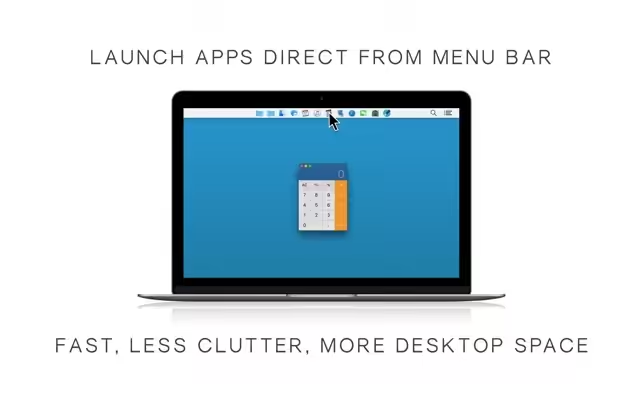
Launch apps and open files with just one click in the system menu bar. Quickly browse folders without leaving a trail of opened windows. Customize the bar by adding your favorite apps, files, and folders as icons or menu items. Launch Bar eases and speeds up your workflow, by combining the most essential features of Finder, Dock, and Launchpad.
Features
- Launch or switch apps, browse folders and open files with a single click
- Add your essential apps, files, and folders in the bar as icon or menu item
- Browse folders without opening and closing Finder windows
- Copy apps and folders automatically from the Dock to the bar
- Free up desktop space by hiding the Dock
- Colored or grayscale bar icons, regular and retina screens
- Use customizable keyboard shortcuts
- Hold the Cmd key down to drag Menu Bar icons, left/right to reposition, down to remove
What's New
October 26, 2026- macOS compatibility
Recent posts
See all ›
Nevercenter CameraBag Pro
v2022 · Updated Nov 24, 2026

GraphicConverter 11.6.1 (5483)
v11.6.1.5483 · Updated Nov 24, 2026

GraphicConverter 11.6.1 (5482)
v11.6.1.5482 · Updated Nov 24, 2026

GraphicConverter 11.6.1 (5481)
v11.6.1.5481 · Updated Nov 24, 2026

Adobe After Effects 2022 v22.1.1
v2022.22.1.1 · Updated Nov 24, 2026

Noir – Dark Mode for Safari 2026.2.4
v2026.2.4 · Updated Nov 24, 2026
Version history
Oct 26, 2026 · 5.4 MB
More apps for you
See all Productivity & Business ›




Ratings & Reviews
(1 rating)Reportar Enlace Caído
Launch Bar · v1.0.4
¡Reporte Enviado con Éxito!
Hemos notificado al equipo técnico. Revisaremos el enlace y lo actualizaremos a la mayor brevedad.