
Screenshots
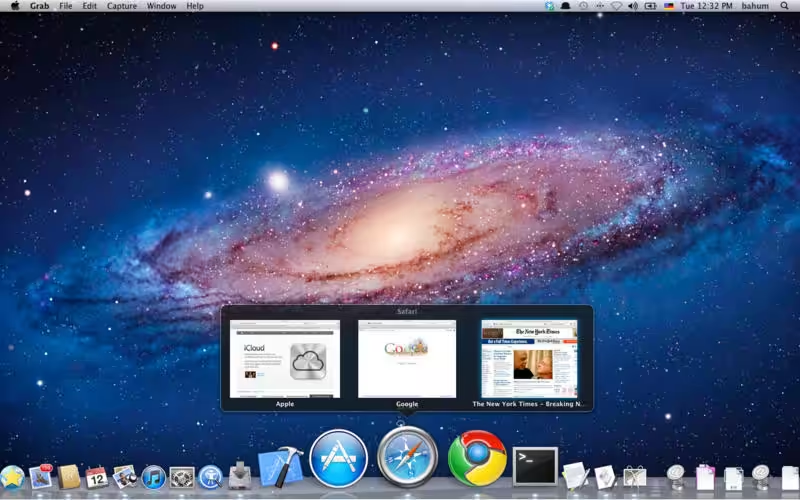

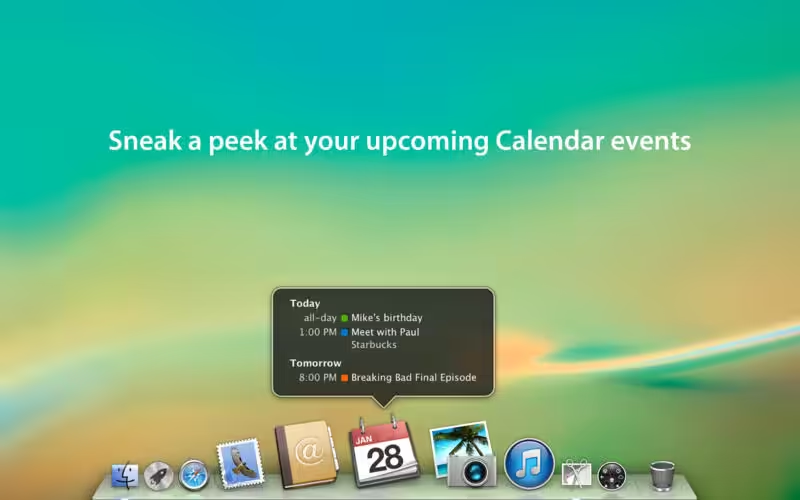
HyperDock adds long-awaited features to your Dock: Select individual application windows just by moving the mouse on a dock item, use mouse clicks to quickly open new windows, and many more.
Features
- Window Previews:
- Ever wondered how to activate a single window instead of a whole application?
- The Window Preview bubble shows you every single window of an application just by holding the mouse on a dock item!
- It even shows minimized windows and windows from other spaces and is fully drag & drop aware.
- Control iTunes: Hover the mouse over the iTunes dock item to view information about the current song, You can pause, skip, rate songs and even adjust volume just by scrolling on the itunes icon.
- Calendar events: Sneak a peek at your upcoming events by hovering the Calendar dock item.
- Window Management: HyperDock brings advanced window management features to Mac OS:
- Move & resize windows just by holding down keys and moving your mouse.
- Automatically resize windows when dragging to screen edges (Window Snapping).
- Scroll on a window’s titlebar to quickly zoom or change its space.
What's New
November 19, 2026- MacOS Mojave compatibility
- Various changes & tweaks
Recent posts
See all ›
Aberrant DSP Digitalis v
v1.0 · Updated Nov 24, 2026

motionVFX – mPrism for Final Cut Pro
v2 · Updated Nov 24, 2026

Ammonite
v1.23.1 · Updated Nov 24, 2026

PopDo 2021.2.8
v2021.2.8 · Updated Nov 24, 2026

SQLPro for SQLite 2022.28
v2022.28 · Updated Nov 24, 2026

Noir – Dark Mode for Safari 2026.2.4
v2026.2.4 · Updated Nov 24, 2026
Version history
Oct 19, 2026 · 8.8 MB
More apps for you
See all System Utilities ›





Ratings & Reviews
(1 rating)Reportar Enlace Caído
HyperDock · v1.8.0.10
¡Reporte Enviado con Éxito!
Hemos notificado al equipo técnico. Revisaremos el enlace y lo actualizaremos a la mayor brevedad.