Screenshots
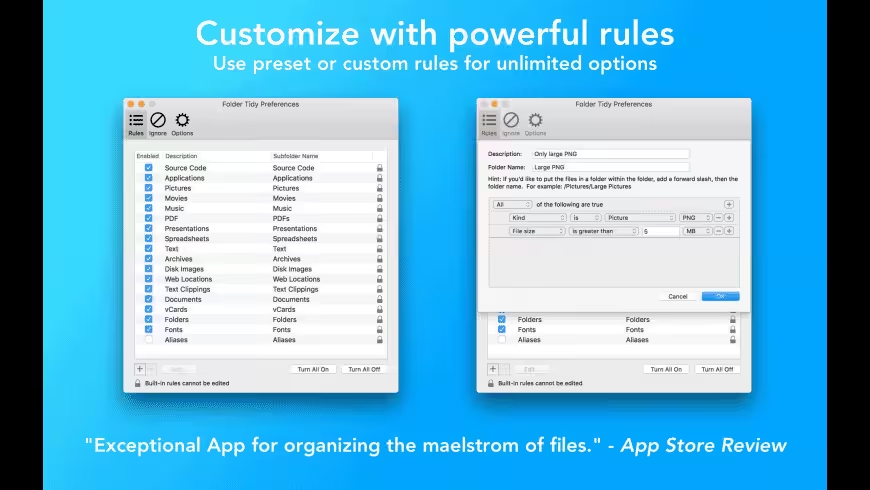
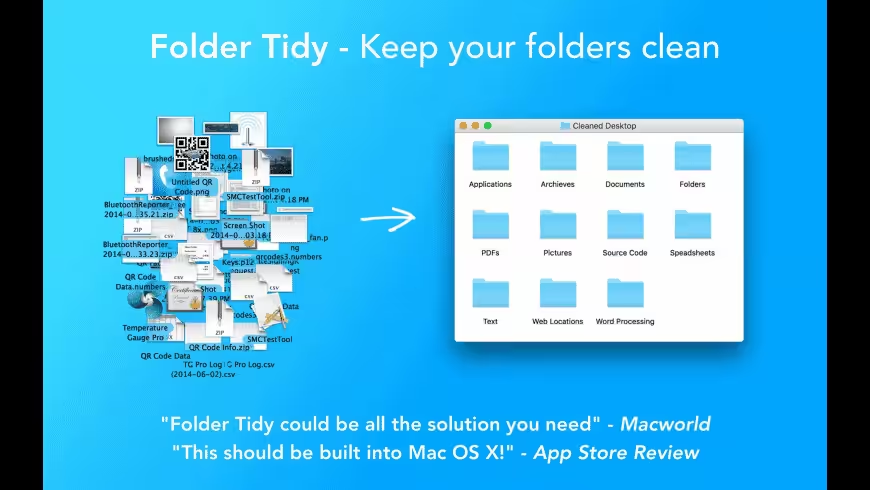
Take a look at your Desktop or the Downloads folder – is it a little disorganized? Or maybe really disorganized? Don’t worry, it’s really easy to clean up. Download Folder Tidy right now and choose the folder to organize and with one click you’ll see the files get sorted into the appropriate subfolders (Pictures, Word Documents, Numbers, Archives, etc).
Features
- Organize your files into subfolders based on the file type and/or rules.
- Use one of the many built-in rules (18 and counting), or create powerful ones based on predicates.
- Choose what types of files to clean up.
- Choose files and folders to ignore during a cleanup.
- Choose where to put the cleaned-up files and folders.
- Options to ignore aliases, folders, and anything with a label.
- Ability to undo the clean-up right away or at a later time
- Hundreds of five-star ratings internationally.
What's New
October 23, 2026- [New] Added extra checks to ensure cloud storage folders are ignored.
- [New] Using the “All On” option for the rules now excludes Folders & Aliases.
Recent posts
See all ›
Aberrant DSP Digitalis v
v1.0 · Updated Nov 24, 2026

motionVFX – mPrism for Final Cut Pro
v2 · Updated Nov 24, 2026

Ammonite
v1.23.1 · Updated Nov 24, 2026

PopDo 2021.2.8
v2021.2.8 · Updated Nov 24, 2026

SQLPro for SQLite 2022.28
v2022.28 · Updated Nov 24, 2026

Noir – Dark Mode for Safari 2026.2.4
v2026.2.4 · Updated Nov 24, 2026
Version history
Oct 23, 2026 · 10.2 MB
More apps for you
See all System Utilities ›





Ratings & Reviews
(1 rating)Reportar Enlace Caído
Folder Tidy · v2.9.7
¡Reporte Enviado con Éxito!
Hemos notificado al equipo técnico. Revisaremos el enlace y lo actualizaremos a la mayor brevedad.