Screenshots
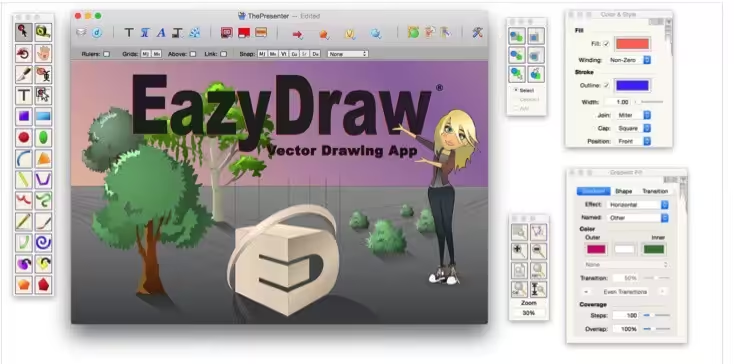
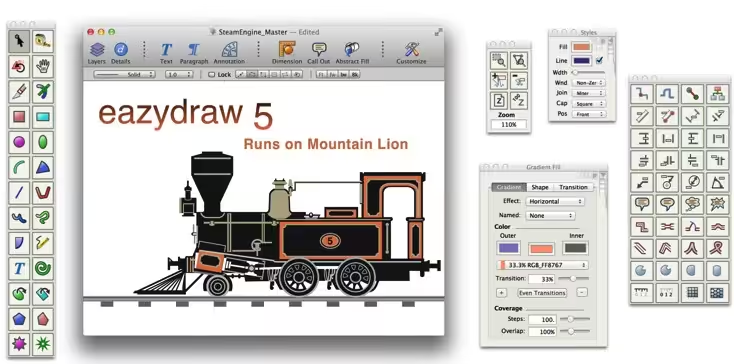
EazyDraw is a vector drawing application. For the full journey from Jaguar to El Capitan, EazyDraw has been the trailblazing app for the new vector-drawing paradigm on the Mac. Includes comprehensive support for bitmap and vector graphic formats. Import and ungroup for editing PDF and EPS. Import and export SVG and now DXF. Preview and publish to EPS and TIFF with RGB or CMYK process colors.
Features
- EazyDraw provides a balanced feature set that includes tools needed for technical drawing, web, and App graphic design, print publishing, logos, page-text layout, and more. Easy enough for everyone but with the depth your project will need.
- Includes comprehensive support for bitmap and vector graphic formats: Import and ungroup for edit PDF, and EPS. Import and export SVG and now DXF. Preview and publish to EPS and TIFF with RGB or CMYK process colors. Exchange scaled CAD drawings using DXF. Preview and publish wide gamut colors for web graphics. Create macOS, iOS, and watchOS app development graphics with Display P3 colors.
- EazyDraw provides full native support for SVG (Scalable Vector Graphic) file format. With EazyDraw you may import and edit SVG, EPS, and PDF vector drawings. Export formats include SVG, PDF, EPS, JPG, TIF, Favicon, Keynote, and others.
- Newer Macs (power books, and iMacs late 2015 and newer) have displays that provide P3 Colors. The P3 color space has a much wider color gamut than sRGB. Simple terms: colors can be brighter on a P3 screen. Actually, there are two requirements to see these brighter colors, the App must support and present P3 colors and the display must be a P3 display.
- EazyDraw 9 is now fully color managed and supports P3 colors on P3 screens. EazyDraw 9 delivers bright RGB colors on screens that are non-P3. For everyday use this is all automatic, on newer iMacs and PowerBooks the colors will simply look better
What's New
November 3, 2026- Minor update for improved stability on Big Sur and M1 processor.
- Fixed problems with preview icon images and Quick Look.
- Completed further improvements to Help pages, content, and illustrations updated to reflect
- Big Sur implementation.
- Corrected issue accessing new Help pages on older macOS versions.
Recent posts
See all ›
Nevercenter CameraBag Pro
v2022 · Updated Nov 24, 2026

GraphicConverter 11.6.1 (5483)
v11.6.1.5483 · Updated Nov 24, 2026

GraphicConverter 11.6.1 (5482)
v11.6.1.5482 · Updated Nov 24, 2026

GraphicConverter 11.6.1 (5481)
v11.6.1.5481 · Updated Nov 24, 2026

Adobe After Effects 2022 v22.1.1
v2022.22.1.1 · Updated Nov 24, 2026

Noir – Dark Mode for Safari 2026.2.4
v2026.2.4 · Updated Nov 24, 2026
More apps for you
See all Media & Design ›




Ratings & Reviews
(1 rating)Reportar Enlace Caído
EazyDraw · v12.11.2
¡Reporte Enviado con Éxito!
Hemos notificado al equipo técnico. Revisaremos el enlace y lo actualizaremos a la mayor brevedad.