Screenshots
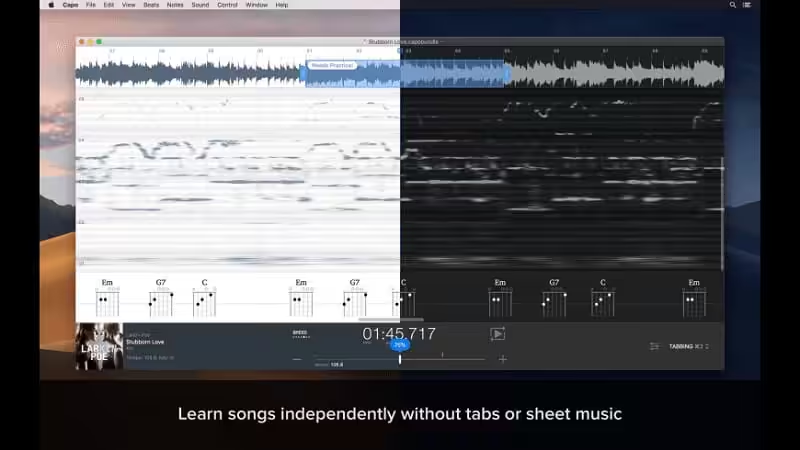
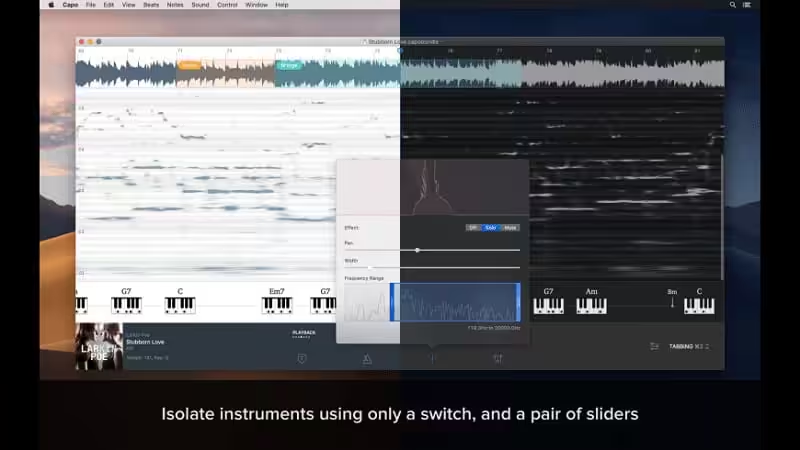
Capo lets you slow down your favorite songs so you can hear the notes and learn how they are played. With Capo, you can quickly tab out your songs atop a highly detailed OpenCL-powered spectrogram display. Capo uses a blend of advanced signal processing and machine learning to help you learn songs by ear. Its powerful, simple-to-use tools allow you to dig deep into the details of a recording so you can learn to play songs more accurately, and in less time.
Features
Slow it down, solo instruments, and listen to quickly-played notes frozen in time.
Start playing songs faster
Automatically detected chords and beats give you a massive head start on learning new tracks.
Pick up where you left offCapo’s Projects store the changes you make to chords, loop regions, and even the playhead location for when you return.
Tab It Out, Hear Each NoteUse your mouse to draw notes inside the spectrogram. As you click and highlight each note, hear it played back as tablature is generated automatically for you—no need to keep a notepad at hand to transcribe solos.
Playback- Slow down audio without affecting the pitch
- Transpose to different keys
- Isolate instruments and vocals
- Eliminate instruments and vocals
- Scrub with audio frozen in time
- Detects chords, and the key of your song files
- Uses beat detection to calculate tempo and provide snapping
- Powerful Spectrogram display for simple tabbing
- Draw on the Spectrogram to generate tablature
- Displays tablature for Guitar, Banjo, Mandolin, Ukulele, and 4-6 string Bass
- Detected chords can be edited one at a time, or globally
- Can display Chord Names, Chord Boxes, Simple Piano diagrams, or nothing if you prefer!
- Chord boxes for Guitar, Banjo, Mandolin, Ukulele, and 4-6 string Bass
- Left-handed chord box display also available
- Song-synchronized click track
- Includes 5 different metronome sounds
- The metronome can count in your looping regions
- Regions can be looped for practice
- Markers mark the notable points in a song
- Rename regions and change their colors to keep organized
- Designed specifically for the Mac
- Switch between Practice and Tabbing modes
- Supports MacBook Pro with Touch Bar
- Toggle visibility of Chords and Notes
- Full-Screen support
- Autosave
- Audio, user entries, and effects are saved into Projects
- Sync projects using iCloud for use with Capo touch and your other Macs
- Share projects using AirDrop, Messages, and more
- Capo can be configured to use custom keystrokes for playback control
- Use MIDI footswitches and controllers to control Capo’s playback
- Purchased, DRM-free audio from iTunes
- WAV, AIFF, MP3, MP4, M4A
- Cannot load protected M4P files
- M4A/AIFF files with playback adjustments
- Audio-synchronized MIDI files with chord and note entries
What's New
October 21, 2026- BUG FIXES
- Capo no longer crashes when opening Project windows for users that have always-visible scroll bars enabled on their Mac.
We love hearing from our customers, so please leave a review on the App Store to share your positive experiences with others, or send us a support email if you have any questions for us. We’re listening, and appreciate all your bug reports and feedback!
Recent posts
See all ›
Nevercenter CameraBag Pro
v2022 · Updated Nov 24, 2026

GraphicConverter 11.6.1 (5483)
v11.6.1.5483 · Updated Nov 24, 2026

GraphicConverter 11.6.1 (5482)
v11.6.1.5482 · Updated Nov 24, 2026

GraphicConverter 11.6.1 (5481)
v11.6.1.5481 · Updated Nov 24, 2026

Adobe After Effects 2022 v22.1.1
v2022.22.1.1 · Updated Nov 24, 2026

Noir – Dark Mode for Safari 2026.2.4
v2026.2.4 · Updated Nov 24, 2026
Version history
Oct 21, 2026 · 29.1 MB
More apps for you
See all Media & Design ›





Ratings & Reviews
(1 rating)Reportar Enlace Caído
Capo · v3.8.1
¡Reporte Enviado con Éxito!
Hemos notificado al equipo técnico. Revisaremos el enlace y lo actualizaremos a la mayor brevedad.