Screenshots
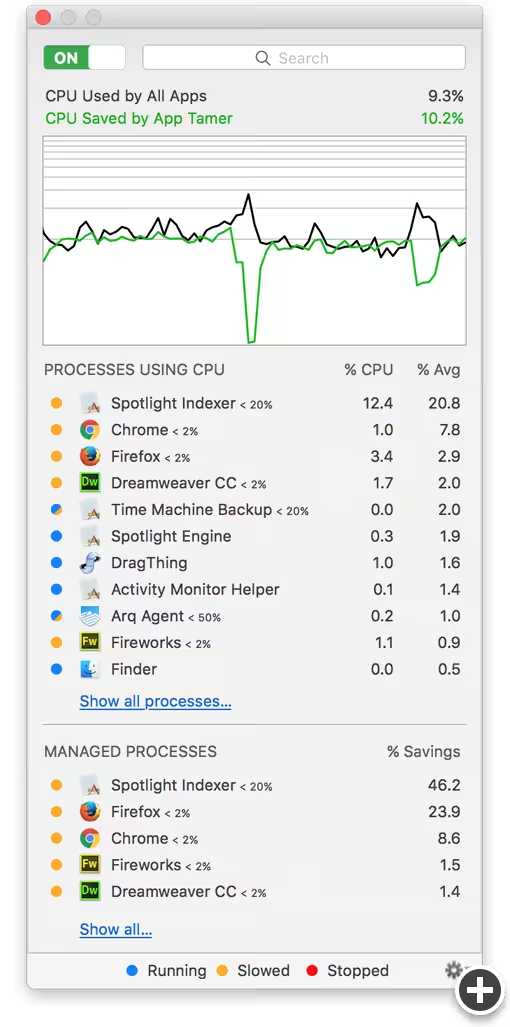
Efficiently manage your CPU cycles, save energy, and more. App Tamer tames your processor-monopolizing apps and keeps them from chewing up excessive CPU time and battery life. Powered by a unique AutoStop feature, App Tamer stops each application when you switch away from it — when you return to that app, it restarts automatically!
Features
- Unlike some utilities that let you manually stop processes, App Tamer automatically handles the details for you. It slows or pauses an application when you switch away from it, then automatically restarts it when you start using it again. Just set it and forget it – App Tamer quietly saves battery and CPU power while you work (or play).
But You’re in Control - You choose which apps to manage. Automatically stop them when you’re not using them, or just slow them down so they don’t use more than a certain amount of CPU.
- App Tamer’s preferences let you tune its behavior to your needs, whether you’re frugally conserving battery power or feeding every last CPU cycle to Starcraft.
- Recovering even a small percentage of your CPU time can translate into significant battery savings. Stopping an application that’s consuming 5% of your CPU can translate into 20 or 30 minutes of additional battery runtime.
- Sometimes an application or macOS system process suddenly starts using large amounts of CPU time. There may be new work to do after you’ve added new pictures to Photos, for example, or it could be due to a bug somewhere in an app or in macOS itself.
- App Tamer detects excessive CPU usage like this and alerts you, letting you decide whether to take control or let the process continue.
What's New
October 24, 2026- Compatible with macOS 11.0 Big Sur.
- Built as a Universal App to run natively on Apple Silicon.
- macOS 10.9 or later is now required for App Tamer to run.
- Putting a CPU limit on Spotlight Indexer could sometimes slow Spotlight searches. This has been fixed.
- App Tamer’s application icon and preference tabs have been updated to match the aesthetics of Big Sur.
- When App Tamer is set to hide or quit an application after a period of idle time, notifications are only posted when that is done successfully. This eliminates repeated notifications from
- App Tamer in cases where an app refuses to hide or quit when it’s told to.
- Eliminated a memory leak.
Recent posts
See all ›
Aberrant DSP Digitalis v
v1.0 · Updated Nov 24, 2026

motionVFX – mPrism for Final Cut Pro
v2 · Updated Nov 24, 2026

Ammonite
v1.23.1 · Updated Nov 24, 2026

PopDo 2021.2.8
v2021.2.8 · Updated Nov 24, 2026

SQLPro for SQLite 2022.28
v2022.28 · Updated Nov 24, 2026

Noir – Dark Mode for Safari 2026.2.4
v2026.2.4 · Updated Nov 24, 2026
Version history
Oct 24, 2026 · 10.6 MB
More apps for you
See all System Utilities ›





Ratings & Reviews
(1 rating)Reportar Enlace Caído
App Tamer · v2.8.4
¡Reporte Enviado con Éxito!
Hemos notificado al equipo técnico. Revisaremos el enlace y lo actualizaremos a la mayor brevedad.