
AnyToISO Professional
3.9.6Screenshots
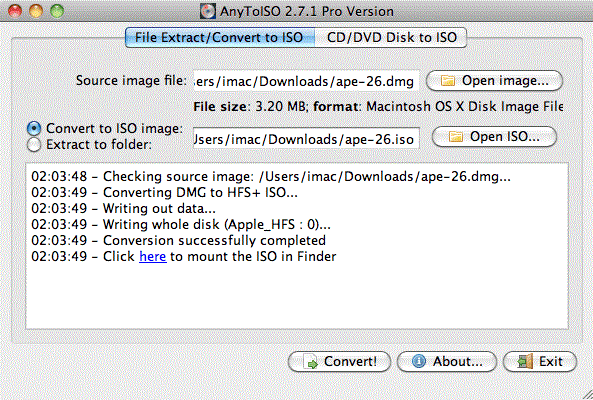
AnyToISO Pro is a simple application that allows users to convert their files into ISO images. The ultimate ISO Creator for macOS: can create ISO from almost everything including all CD/DVD images formats popular on Internet (NRG, MDF, UIF, DMG, ISZ, BIN, DAA, PDI, CDI, IMG, etc), CD/DVD/Bluray disks or simply from a local folder.
Features
- Ability to convert a disk image of the formats BIN, MDF, PDI, CDI, NRG, B5I, IMG CD / DVD-ROM format ISO.
- Fast and simple technology.
- AnyToISO supports all CD / DVD formats popular on the Internet.
- AnyToISO works on Windows and Mac OS X.
- Most CD / DVD burning software works with ISO images and their native images only. Use AnyToISO for conversion before burning.
- With AnyToISO you can mount any CD / DVD image found on the Internet to your Parallels / VMWare virtual machine.
- The program is free to convert CD images, Professional license allows to convert DVD images.
- AnyToISO supports the following CD / DVD image formats popular on Internet.
- Convert – convert the image to the ISO format
- Extract – extract the image to a local drive
What's New
October 25, 2026New:
- Extract GPT .img files
Improved:
- The app is now notarized for the upcoming macOS 10.15 Catalina release
- Support of Little Snitch Internet Access Policy
- Translations update
Fixed:
- Extraction of FAT32 .img files
Recent posts
See all ›
Aberrant DSP Digitalis v
v1.0 · Updated Nov 24, 2026
motionVFX – mPrism for Final Cut Pro
v2 · Updated Nov 24, 2026

Ammonite
v1.23.1 · Updated Nov 24, 2026

PopDo 2021.2.8
v2021.2.8 · Updated Nov 24, 2026

SQLPro for SQLite 2022.28
v2022.28 · Updated Nov 24, 2026

Noir – Dark Mode for Safari 2026.2.4
v2026.2.4 · Updated Nov 24, 2026
Version history
Oct 25, 2026 · 13.7 MB
More apps for you
See all System Utilities ›





Ratings & Reviews
(1 rating)Reportar Enlace Caído
AnyToISO Professional · v3.9.6
¡Reporte Enviado con Éxito!
Hemos notificado al equipo técnico. Revisaremos el enlace y lo actualizaremos a la mayor brevedad.