
Screenshots
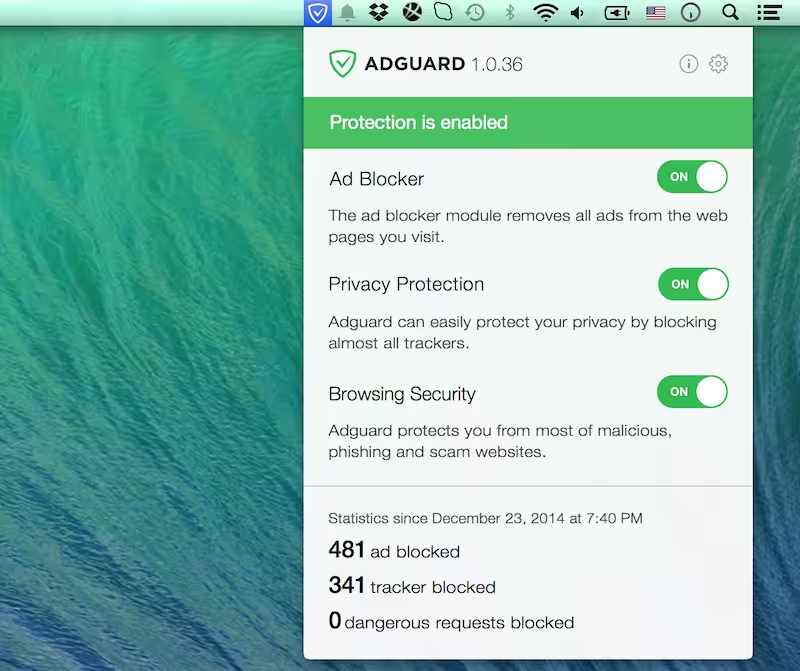
AdGuard can make your online experience safer because, although Macs and Apple laptops are generally considered safe to use when it comes to ad blockers, They Can Still experience real problems. Existing solutions do not take into account the specifics of OS X, which significantly impacts the stability of work in Safari. As a result, these ad-blocking extensions often fail to perform their intended function properly, particularly when video ads are a concern.
Features
Using “Automatic proxy” filtering mode: If you face problems in Big Sur or Monterey that can’t be resolved by any of the methods above, you can try switching AdGuard to Automatic proxy mode.
- Open AdGuard’s menu.
- Select Preferences….
- Switch to the Network tab.
- Click the Select Mode… button.
- Select Automatic Proxy.
- Efficient ad blocking: How to remove Ads on Mac? AdBlocker is the answer. Pop-ups, video adverts, banners, and such — they will all go away. Due to unnoticeable background filtering and cosmetic processing, all you will see are clean pages with the content you came for.
- Safe web surfing: Mac computers are generally less susceptible to malware, but it would be a mistake to ignore potential threats. There are still plenty of phishing and fraudulent websites on the Internet, and downloading AdGuard will protect you from them.
- Privacy protection: AdGuard Mac fights against all trackers and analytical systems that spy on you, thanks to the special Spyware filter designed by AdGuard for the macOS team. It accumulates rules against all known online analytics that try to steal your private data.
- Filtering inside apps: There are plenty of otherwise great apps that can’t resist showing ads to you. Let you have the best of both worlds by giving an option to filter the traffic of any app installed on your Mac.
- Works everywhere: Can’t choose a favorite browser? No problem, the program stops ads in all of them, from Safari and Chrome to the most exotic ones.
- 3 in 1: No need for extra applications or browser extensions. Just download an ad blocker for Mac by AdGuard and kill a small flock of birds with one stone.
What's New
October 27, 2026- Automatic filter subscriptions detection
- Most filters have “subscribe” buttons on their homepages or in other places. From now on, AdGuard will be able to intercept click on such links and offer you to add these filters to the app. It’s not much perhaps, but it’s a nice thing to have and it certainly won’t hurt anyone?
- No internet connection with custom DNS in DNSCrypt
- the Adguard top kill process constantly crashes on macOS Catalina
- The “Reset Settings” option hangs the app
- Compatibility issues
- Algorithm for automatic language filters activation
- Automatic detection of certificate issues in Firefox
- The new settings reconfiguration method does not require closing active connections
- Localizations have been updated
Recent posts
See all ›
Aberrant DSP Digitalis v
v1.0 · Updated Nov 24, 2026

motionVFX – mPrism for Final Cut Pro
v2 · Updated Nov 24, 2026

Ammonite
v1.23.1 · Updated Nov 24, 2026

PopDo 2021.2.8
v2021.2.8 · Updated Nov 24, 2026

SQLPro for SQLite 2022.28
v2022.28 · Updated Nov 24, 2026

Noir – Dark Mode for Safari 2026.2.4
v2026.2.4 · Updated Nov 24, 2026
Version history
Oct 27, 2026 · 120.1 MB
More apps for you
See all System Utilities ›





Ratings & Reviews
(1 rating)Reportar Enlace Caído
Adguard · v2.17.2.1984
¡Reporte Enviado con Éxito!
Hemos notificado al equipo técnico. Revisaremos el enlace y lo actualizaremos a la mayor brevedad.