A Better Finder Attributes is the ultimate file-tweaking tool for OS X. It combines photo-shooting date and file date changing along with a few unique tricks of its own.
Download
3 versions
Download Now
7.50 · FREE · Universal
All older versions
- Size
- 15 MB
- Requires
- Universal
- Architecture
- Universal
- Features
- Screenshots 1
- Whats new?
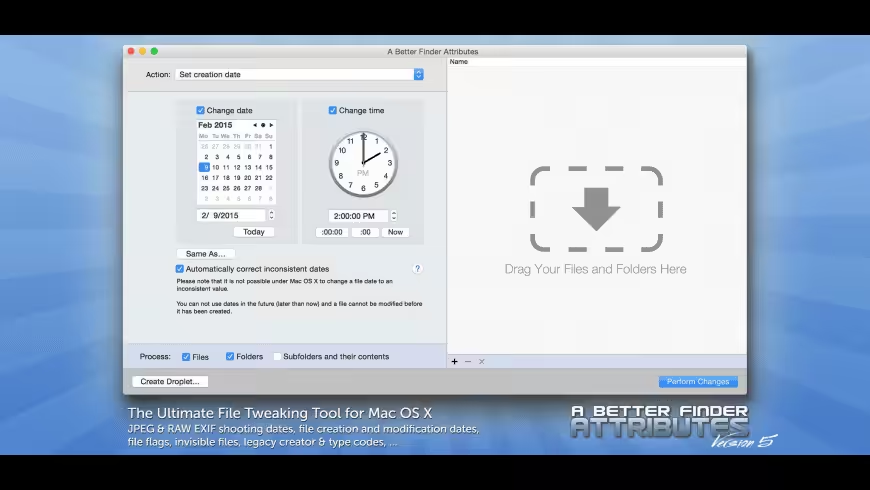
- Change EXIF Timestamps at Will – A Better Finder Attributes 5 allows you to manipulate JPEG, CR2, NEF, ARF CRW, and CIFF EXIF timestamps at will by setting them to specific times or batch adjusting them by adding and removing time (useful for correcting the timestamps of images taken with a digital camera with an incorrectly set clock and to compensate for timezone changes).
- Correct Finder Sorting for JPEG EXIF and RAW Photo – A Better Finder Attributes 5 also allows us to synchronize the file creation and modification dates with the shooting dates of JPEG EXIF as well as a wide variety of RAW formats, so that files sort properly in the Finder and other systems.
- Total File and Folder Creation and Modification Date Control – A Better Finder Attributes 5 gives you total control over file creation and modification dates, setting them to specific times and dates, adding or removing time, or simply removing them altogether.
- Automate with Droplets – A Better Finder Attributes 5 allows you to save frequently used settings to separate “droplet” applications. Drag-and-drop files onto the droplet application to apply the changes stored in it. Double click the droplet to edit the stored settings.
What's New in Version 7.50
- The new version adds improved support for the QuickTime Creation Date field.
Older versions & Compatibility
Running macOS Catalina, Big Sur, Monterey, or Ventura? Download tested builds for Intel and Apple Silicon.
-
7.50 LatestOct 07, 2026 · 15 MB · Universal
-
7.49 ArchivedOct 07, 2026 · 15 MB · Universal
-
7.48 ArchivedOct 07, 2026 · 15 MB · Universal
Verified secure servers
Official Website


No comments yet
Share whether this build worked on your Mac, on which macOS version, and your tips.