
TunesKit Screen Recorder
2.6.0Screenshots
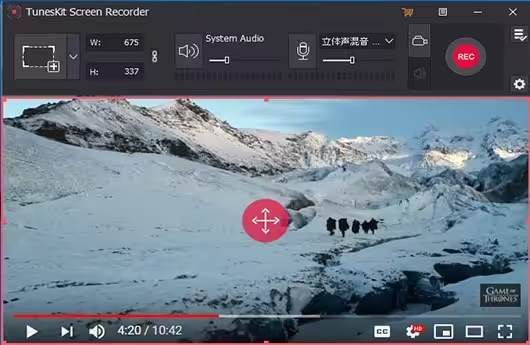
TunesKit Screen Recorder, you can set your preferences as you like. A handy 2-in-1 video and audio recorder that lets you capture any video and audio from any source on your computer screen with a single click, and edit and save the recordings in any format and device with high quality retained. In addition, you can also extract audio from videos on the computer, etc. with lossless quality.
Features
Powerful as it is, TunesKit Screen Recorder is capable of recording anything you like on the PC or Mac screen, such as online videos, computer games, app tutorials, how-tos, video lectures, webinars, video conferences, video calls, live broadcasts, and much more in an easy way.
It’s not only a high-quality video recorder, but also an independent audio capture that allows users to grab any audio from system sound and/or microphone, including streaming music, sound effects, background music, or another appearing sound through the browser, media player or many other applications.
Record screen video and audio separately or simultaneously:TunesKit Screen Recorder enables users to record video and audio from a screen, microphone or webcam. What if you want to record just video or audio? It’s easy! The program offers two options for users: record video (with audio) or record audio-only.
In other words, you can record screen video along with audio, or even mute the sound; you can also choose to capture merely audio, either system sound or microphone audio or both at the same time. You’re given full flexibility to do whatever according to your needs.
Flexible options for users to adjust the settings:Or, you can use the time scheduler to make a scheduled recording while you’re away by setting the start time and end time in advance. Besides, you can also customize your own keyboard shortcuts, add a watermark, and highlight your cursor or clicks with different interesting icons.
Record screen and save in any format and device:As an all-round screen recording utility, TunesKit Screen Recorder offers you the ability to save recordings on the computer in numerous formats such as MP4, M4V, MOV, MKV, WMV, MPEG, 3GP, WebM, 4K HD videos; MP3, M4A, M4B, AAC, FLAC, WAV, and many others.
You can also preset and transfer your recordings to various portable devices like iPhone, iPad, Apple Generic, Galaxy phone and tablet, Huawei and other Android Generic as well as game consoles and smart TVs, etc. In addition, you’re allowed to upload and share the recording to social media platform such as YouTube, Facebook, Vimeo, etc.
Output high-resolution recordings:With the advanced recording technology adopted in the program, TunesKit Screen Recorder is a perfect tool to capture any footage while keeping the high original quality. To be specific, this professional video capturing software can record screen in high resolution at up to 60 frames per second
What's New
November 21, 2026- Release notes were unavailable when this listing was updated.
Recent posts
See all ›
Compress Any Video PRO
v2.1 · Updated Nov 24, 2026

GraphicConverter 11.6.1 (5487)
v11.6.1.5487 · Updated Nov 24, 2026

Adobe Acrobat DC Pro 2022.001.20112
v2022.001.20112 · Updated Nov 24, 2026

Maxon Cinema 4D R26.
v013 · Updated Nov 24, 2026

Luminar Neo 1.0.5 (11374)
v1.0.5.11374 · Updated Nov 24, 2026

Sip 4.0.0
Updated Nov 24, 2026
Version history
Oct 19, 2026 · 58.6 MB
More apps for you
See all Productivity & Business ›





Ratings & Reviews
(1 rating)Reportar Enlace Caído
TunesKit Screen Recorder · v2.6.0
¡Reporte Enviado con Éxito!
Hemos notificado al equipo técnico. Revisaremos el enlace y lo actualizaremos a la mayor brevedad.