Screenshots
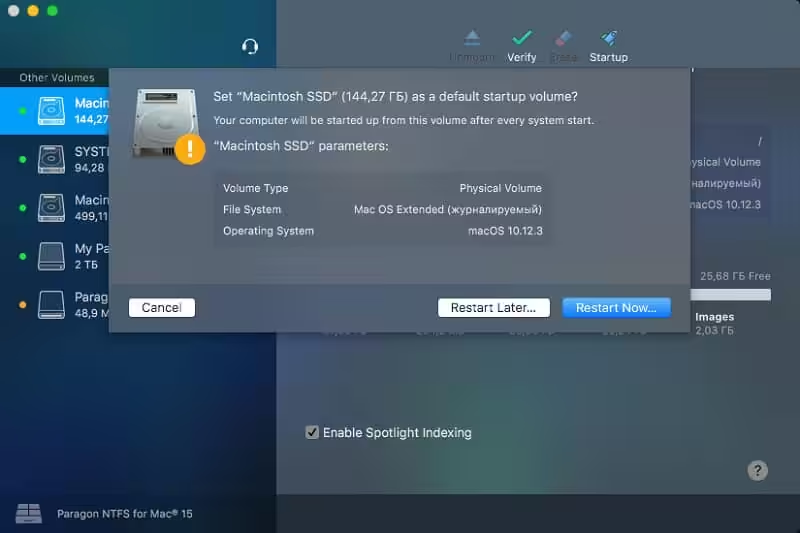
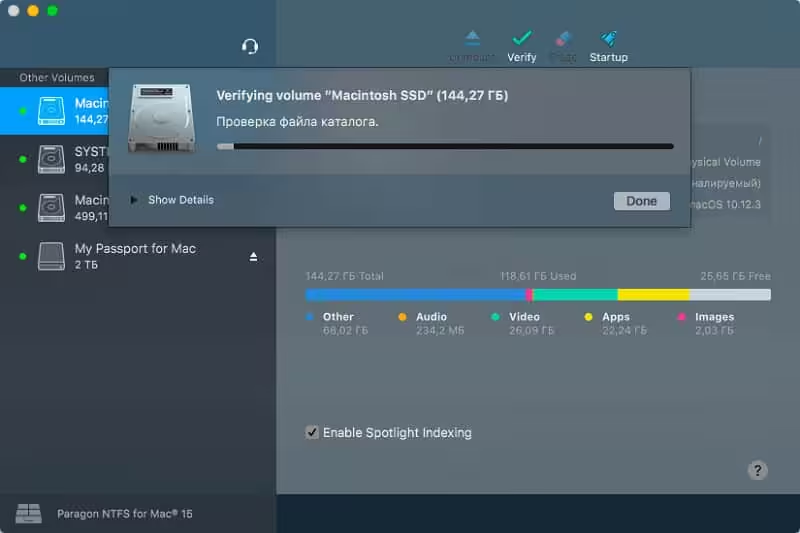
Paragon NTFS for Mac breaks down the barriers between Windows and macOS. Paragon NTFS effectively solves the communication problems between the Mac system and NTFS, providing full read and write access to Windows NTFS partitions under macOS. Excellent solution for end-users, SOHO, and enterprise, supports all NTFS versions from Windows NT 3.1 to Windows 10 (NTFS versions 1.2, 3.0, and 3.1), and mounts the NTFS volumes as native ones.
Features
- Can’t write, copy, edit, or delete files on Windows NTFS-formatted drives from your Mac?
- It’s because Apple’s macOS has limited support for Windows volumes — that is, you can only read data, but can’t write or delete anything.
- Paragon NTFS for Mac 15 provides blazing fast, unlimited read/write access to NTFS hard drives, SSDs or thumb drives formatted for Windows computers!
- Thanks to our lightweight and extremely useful menu bar app.
- Access all your NTFS drives and perform the most common volume operations like mount, unmount, and verify.
- Quickly restart your Mac in Windows from the menubar (assuming it’s installed on your mounted NTFS drive).
If you’ve ever used Apple’s Disk Utility, you already know how to use Paragon NTFS for Mac 15. If you haven’t, it will only take a few moments to get acquainted. Paragon NTFS for Mac 15 inherits the best of Apple’s Disk Utility and takes it to the next level, augmenting NTFS volume operations and advanced mount options.
Mounting is entirely under your control- Enable Ownership: Select this option if you’d like to specify which users are allowed to access each newly-created file or folder, along with their read/write/execute privileges.
- Save last access time: Select this option if you need macOS to recall every file you access on a selected volume.
- Enable Spotlight Indexing: Select this option if you want instant Spotlight search, and if you want to view the detailed info about volume used space: how much space is occupied by applications, music, video, photos, etc.
- Mount in Read-Only: Select this option, if you need to access sensitive data without modifying any files.
- Do not mount automatically: Select this option if you want to manually control access to a volume.
- English
- Deutsch
- Русский
- Español
- Français
- Italiano
- Čeština
- 简体中文
- 繁體中文
- 한국어
- Svenska
- Suomi
- Magyarország – Magyar
What's New
October 24, 2026- Release notes were unavailable when this listing was updated.
Recent posts
See all ›
Aberrant DSP Digitalis v
v1.0 · Updated Nov 24, 2026

motionVFX – mPrism for Final Cut Pro
v2 · Updated Nov 24, 2026

Ammonite
v1.23.1 · Updated Nov 24, 2026
PopDo 2021.2.8
v2021.2.8 · Updated Nov 24, 2026

SQLPro for SQLite 2022.28
v2022.28 · Updated Nov 24, 2026

Noir – Dark Mode for Safari 2026.2.4
v2026.2.4 · Updated Nov 24, 2026
Version history
Oct 24, 2026 · 57.6 MB
More apps for you
See all System Utilities ›





Ratings & Reviews
(1 rating)Reportar Enlace Caído
Paragon NTFS · v15.8.243
¡Reporte Enviado con Éxito!
Hemos notificado al equipo técnico. Revisaremos el enlace y lo actualizaremos a la mayor brevedad.