
Screenshots
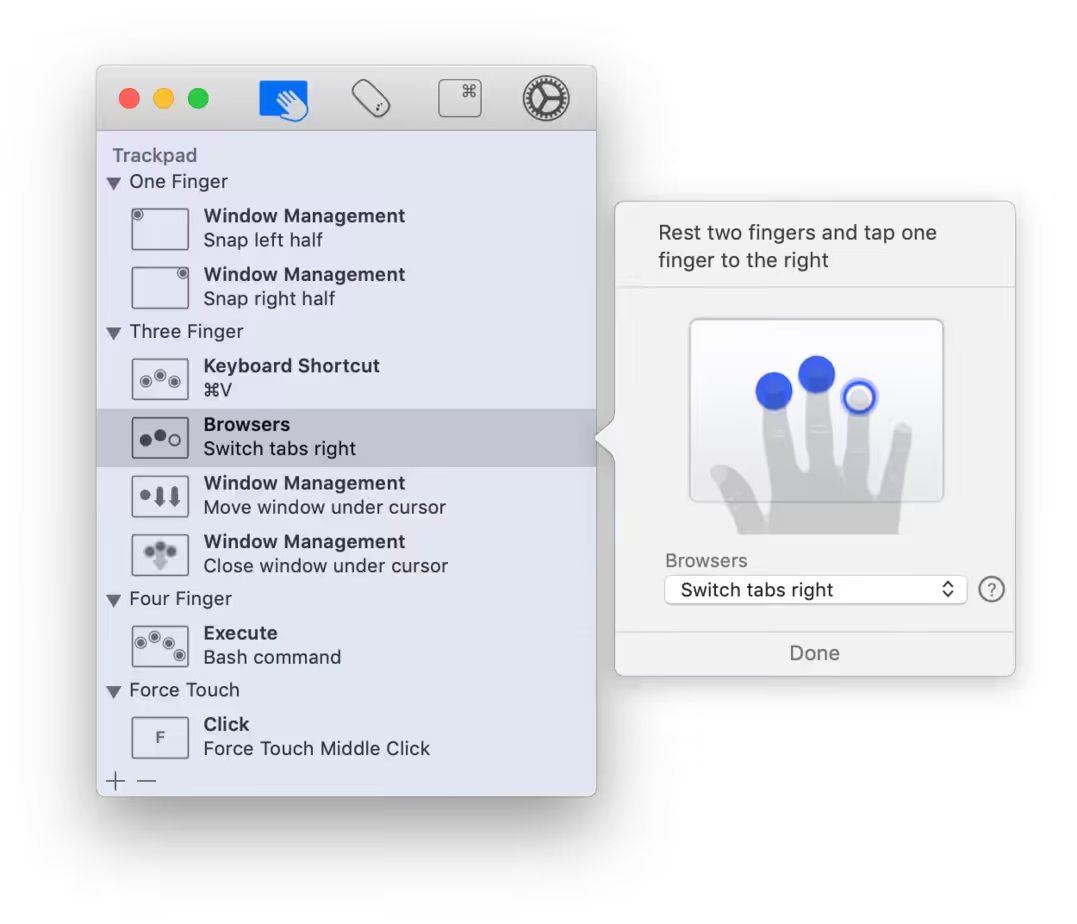
Easily add gestures to macOS. Multitouch lets you tie a custom action to a specific Magic Trackpad or Magic Mouse gesture. For example, a three-finger click can execute a paste. Improve your workflow by executing keyboard shortcuts, controlling your browser’s tabs, performing a middle mouse click, and much more.
Features
- Privacy. No user data is gathered from the app.
- Does not require Accessibility privileges to run.
What's New
November 4, 2026- Added gestures: rest three, four, or five touches and remove all but one
- Added gestures: rest three or four touches, remove all but one and move in a direction
- Added initial key remapping capability
- Added mouse button remap capability
- Adjusted rest one swipe one and rest one swipe two sensitivity, and tied them better to the swipe & precision settings in the Settings tab
- Adjusted rest one tap one precision
Recent posts
See all ›
Nevercenter CameraBag Pro
v2022 · Updated Nov 24, 2026

GraphicConverter 11.6.1 (5483)
v11.6.1.5483 · Updated Nov 24, 2026

GraphicConverter 11.6.1 (5482)
v11.6.1.5482 · Updated Nov 24, 2026

GraphicConverter 11.6.1 (5481)
v11.6.1.5481 · Updated Nov 24, 2026

Adobe After Effects 2022 v22.1.1
v2022.22.1.1 · Updated Nov 24, 2026

Noir – Dark Mode for Safari 2026.2.4
v2026.2.4 · Updated Nov 24, 2026
More apps for you
See all System Utilities ›





Ratings & Reviews
(1 rating)Reportar Enlace Caído
Multitouch · v2.0.2
¡Reporte Enviado con Éxito!
Hemos notificado al equipo técnico. Revisaremos el enlace y lo actualizaremos a la mayor brevedad.