
Movavi Video Editor Plus 2022
22.4.1Screenshots
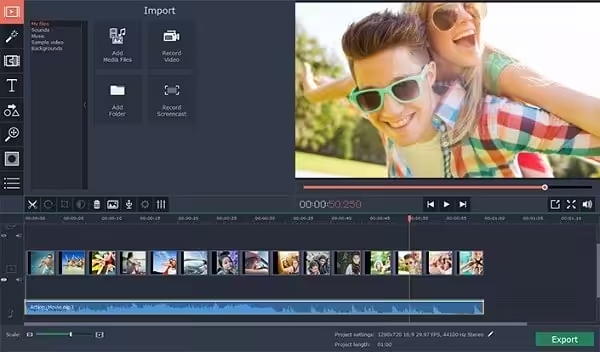
Movavi Video Editor Plus is a powerful yet easy-to-use video processing program for Windows. Cut and join video clips with zero quality loss, apply stylish video effects and filters, add music, titles, and much more! Despite its extensive functionality, Movavi Video Editor software is very easy to work with: take a pinch of fantasy, mix it with some free time, and you’ll have a Hollywood-like video with a lot less effort.
Features
- Add Media Files: Import videos from your computer or external device, add images for a slideshow or as cut-ins between video segments.
- Transform Your Footage: Turn your clips into a story: trim and crop segments, edit out unnecessary content, improve image quality, add titles, special effects, and music.
- Save the Movie: Export your video in any format compatible with Mac OS X: AVI, MPEG-4, MOV, and many more. Movavi Video Editor Plus upload your film to YouTube or Google Drive directly from the program.
- Multitrack editing: add new tracks, change the order
- Independent tracks: unlink overlay tracks and place clips anywhere you want on them
- Enhanced design: the Timeline is now more compact and easier to navigate
Built-in content: Use ready-made video clips, backgrounds, music, and sounds from the Video Editor library.
Video stabilization: Stabilize shaky footage without affecting overall video quality.
Picture in picture: Display any number of videos on a single screen.
Audio editing tools: Tweak audio frequency, apply normalization, remove noise, add sound effects.
Webcam capture: Capture footage from your web camera.
Beat detection: Detect audio beats to sync the pace of your video with the music.
Audio capture: Record a voiceover, capture sound from your guitar or synth.
High-level performance: Edit and export videos quickly, thanks to supporting Intel® hardware acceleration.
What's New
October 21, 2026- Don’t miss out on fresh packs in Movavi Effects Store, helpful tutorials, and other news. Click Notifications at the bottom of the Timeline to see what you can find!
- Now, when you click on the star icon to look through the effects applied to a clip, it will open a tab where you can remove the effects.
- To remove black bars from several clips at once, select the clips you need and crop only one of them.
- Apply noise reduction, audio effects or equalizer presets to several clips at once.
Recent posts
See all ›
Compress Any Video PRO
v2.1 · Updated Nov 24, 2026

GraphicConverter 11.6.1 (5487)
v11.6.1.5487 · Updated Nov 24, 2026

Adobe Acrobat DC Pro 2022.001.20112
v2022.001.20112 · Updated Nov 24, 2026

Maxon Cinema 4D R26.
v013 · Updated Nov 24, 2026

Luminar Neo 1.0.5 (11374)
v1.0.5.11374 · Updated Nov 24, 2026

Sip 4.0.0
Updated Nov 24, 2026
Version history
Oct 21, 2026 · 126.4 MB
More apps for you
See all Application ›




Ratings & Reviews
(1 rating)Reportar Enlace Caído
Movavi Video Editor Plus 2022 · v22.4.1
¡Reporte Enviado con Éxito!
Hemos notificado al equipo técnico. Revisaremos el enlace y lo actualizaremos a la mayor brevedad.