
Screenshots
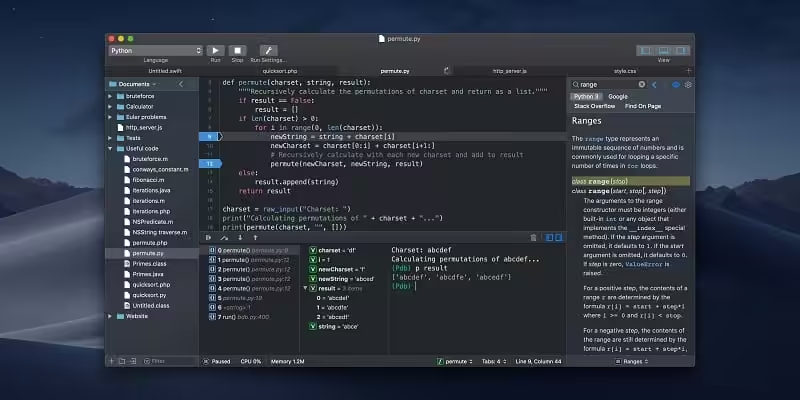
CodeRunner, an advanced, highly flexible, and easy-to-use programming editor, supports a large number of languages and delivers big IDE features while remaining lightweight and clutter-free. CodeRunner can run code in 23 languages out of the box and can be easily extended to run code in any other language. Notable features include debugging with breakpoints in lots of languages, IDE-level code completion, and lots of other high-end features, making it easier than ever to write and work with code.
Features
Any programmer knows the importance of good code completion. That’s why CodeRunner delivers powerful IDE-level code completion for most languages, including fuzzy-search, tab-selectable placeholders, and documentation snippets.
Run Code in Any LanguageCodeRunner was built on the principle that you need to be able to run your code instantly, in any language. CodeRunner can run code in 25 languages out-of-the-box and can be easily extended to support other languages. Adding a language is as easy as entering its terminal command.
CodeRunner can also run multi-file projects without any manual setup required.
Debugging with BreakpointsA good debugging workflow is a key to producing quality code. With CodeRunner, you can set breakpoints and step through your code in more than a dozen languages instantly.
Just click the text margin to set a breakpoint and start debugging. Explore the call stack, view and edit variables, and interact with the debugger.
Debugging code in any language has never been so quick and easy.
More Features- Documentation sidebar
- File navigator
- TextMate syntaxes and themes
- Code templates
- Multiple selections
- Symbol navigator
- Web inspector and web tools
- Automatic indentation support
- Live running process statistics
- Run with arguments & input sets
- Highly configurable
- Software updates
What's New
November 5, 2026- Improved resolution of the PATH environment variable, eliminating run issues with certain third-party tools and libraries.
- Ability to stop running code-producing output while stuck in an infinite loop.
- More space for debugger variables by only displaying action buttons during mouse-over.
- Fixed an issue causing elevated CPU usage when editing some C++ files.
Recent posts
See all ›
Compress Any Video PRO
v2.1 · Updated Nov 24, 2026

GraphicConverter 11.6.1 (5487)
v11.6.1.5487 · Updated Nov 24, 2026

Adobe Acrobat DC Pro 2022.001.20112
v2022.001.20112 · Updated Nov 24, 2026

Maxon Cinema 4D R26.
v013 · Updated Nov 24, 2026

Luminar Neo 1.0.5 (11374)
v1.0.5.11374 · Updated Nov 24, 2026

Sip 4.0.0
Updated Nov 24, 2026
Version history
Oct 16, 2026 · 89.6 MB
More apps for you
See all Developer Tools ›





Ratings & Reviews
(1 rating)Reportar Enlace Caído
CodeRunner · v4.5.0
¡Reporte Enviado con Éxito!
Hemos notificado al equipo técnico. Revisaremos el enlace y lo actualizaremos a la mayor brevedad.