BlueHarvest is an essential macOS System Utilities tool, meticulously designed to eliminate disruptive DS_Store and _AppleDouble files. It ensures a cleaner, more efficient Mac experience, optimizing storage and streamlining workflows, especially for version control systems. Enjoy a clutter-free environment, enhanced performance, and native support on Apple Silicon Macs.
Download
2 versions
Download Now
8.5.1 · FREE · Universal
All older versions
- Size
- 6.9 MB
- Requires
- Universal
- Architecture
- Universal
- Features
- Screenshots 1
- Whats new?
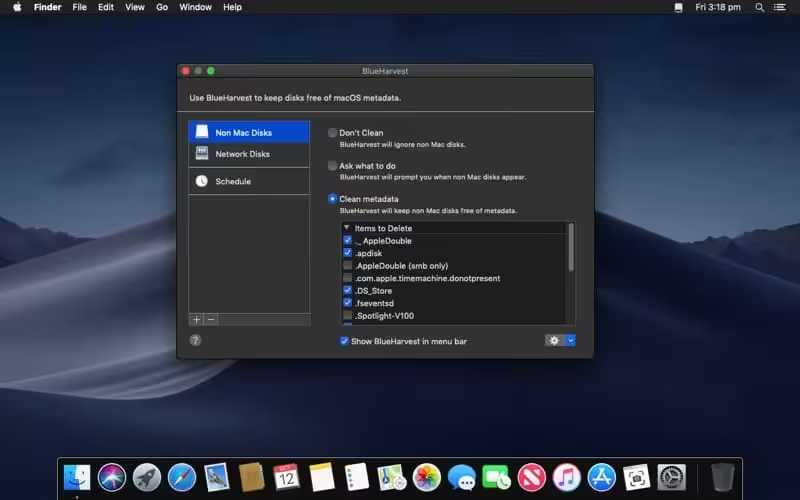
- DS_Store File Extermination: Automatically removes the hidden Desktop Services Store files that often clutter directories and external drives.
- _AppleDouble File Removal: Efficiently eradicates _AppleDouble (resource fork) files, resolving compatibility issues on non-Mac systems.
- Automatic Volume Cleaning: Set BlueHarvest to automatically clean specified volumes or network shares upon connection or modification.
- On-Demand Folder Cleanup: Instantly scan and clean any selected folder or drive with a simple drag-and-drop action.
- Customizable Exclusion Rules: Define specific rules to prevent BlueHarvest from processing certain essential files or directories.
- Version Control Optimization: Keeps your repositories clean by preventing the inadvertent inclusion of unwanted system files.
- Reclaim Disk Space: Maximize available storage by eliminating superfluous hidden files that consume valuable memory.
What's New in Version 8.5.1
- Updated for better support of macOS 13 Ventura.
Older versions & Compatibility
Running macOS Catalina, Big Sur, Monterey, or Ventura? Download tested builds for Intel and Apple Silicon.
-
8.5.1 LatestOct 06, 2026 · 6.9 MB · Universal
-
8.5.0 ArchivedOct 06, 2026 · 6.9 MB · Universal
Verified secure servers
Official Website



No comments yet
Share whether this build worked on your Mac, on which macOS version, and your tips.