Screenshots
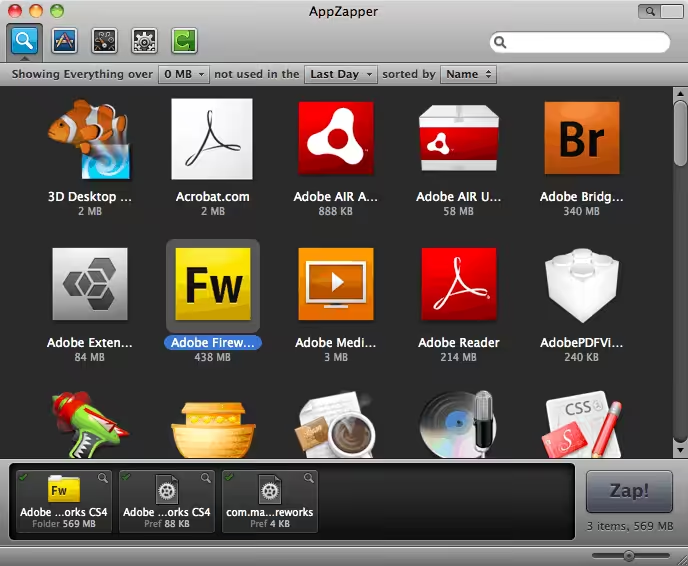
Everybody loves the drag-and-drop nature of OS X. Drag an app into your applications folder, and it’s installed. You’d think it would be that easy to delete an app — just a matter of dragging it to the trash. It’s not. Apps install support files that generate clutter. Introducing AppZapper. Simply drag one or more apps onto AppZapper.
Features
Hit List is a brand-new feature that allows you to visually browse all of the apps on your computer. Search, scroll, and filter your way through every app you have installed. Simply select an app to see its related files, and hit ‘Zap!’ to move them to the trash instantly.
We love how AppZapper takes care of all the apps you don’t want. But what about the keepers? My Apps is a beautiful, new way of storing license and registration information for applications you’ve purchased, right inside AppZapper.
Simply drag an app into My Apps to create a new card for it. Click the card to flip it over and enter all of your purchase details. You can freely organize and sort through your cards, and everything is saved in AppZapper – so it’s there when you need it. If you ever collected trading cards as a kid, you’ll be right at home here.
What's New
October 25, 2026- Release notes were unavailable when this listing was updated.
Recent posts
See all ›
Nevercenter CameraBag Pro
v2022 · Updated Nov 24, 2026

GraphicConverter 11.6.1 (5483)
v11.6.1.5483 · Updated Nov 24, 2026

GraphicConverter 11.6.1 (5482)
v11.6.1.5482 · Updated Nov 24, 2026

GraphicConverter 11.6.1 (5481)
v11.6.1.5481 · Updated Nov 24, 2026

Adobe After Effects 2022 v22.1.1
v2022.22.1.1 · Updated Nov 24, 2026

Noir – Dark Mode for Safari 2026.2.4
v2026.2.4 · Updated Nov 24, 2026
Version history
Oct 25, 2026 · 3.9 MB
More apps for you
See all System Utilities ›





Ratings & Reviews
(1 rating)Reportar Enlace Caído
AppZapper · v2.0.3 Fix
¡Reporte Enviado con Éxito!
Hemos notificado al equipo técnico. Revisaremos el enlace y lo actualizaremos a la mayor brevedad.